Free Value Range Compressor
A camera sees a value range no pencil or paint can match. This tool measures your photo's real tonal span and re-keys it into the range your medium reaches: a preset, or your own range measured from a photo of your swatches. Pin the values that matter, keep local contrast while the big masses compress, and print a numbered value map to paint from. Exports PNG. Free, with no sign-up, and your picture never leaves your device.
Drop an image here, or paste from clipboard
Your image stays on your device. Nothing is uploaded.
JPG, PNG, WebP, GIF, AVIF or BMP
Pinned values.Fix the lightness of any tone; the curve bends smoothly through every pin and never reverses.
Keep local contrast.Compress the big light and dark masses while keeping the texture inside them.
Measure your medium.Your real range from a photo of your darkest mark and your paper, whatever the exposure.
Numbered value map.Five, seven or nine value steps, outlined and numbered from 1 (darkest), with a key.
- Free
- No sign-up
- Runs in your browser: your image never leaves your device
What is a value range compressor?
A value range compressor is a tool that re-keys a photograph's span of lights and darks into the narrower range a drawing or painting medium reaches. It maps the photo's measured lightness onto the medium's darkest and lightest values, so you plan with values your materials can actually make.
How to use the Value Range Compressor
The tool takes 5 steps, all on your device.
Drop in your reference photo; the tool measures its tonal span.
Pick your medium and support, or measure your own: photograph your darkest mark on your paper and place the two points.
Choose a curve, and pin any value you want to keep exactly, such as a skin tone.
Turn on Keep local contrast so texture survives the squeeze, and check the clipped zones.
Switch to Numbered map for a paint-by-values plan, then export the PNG.
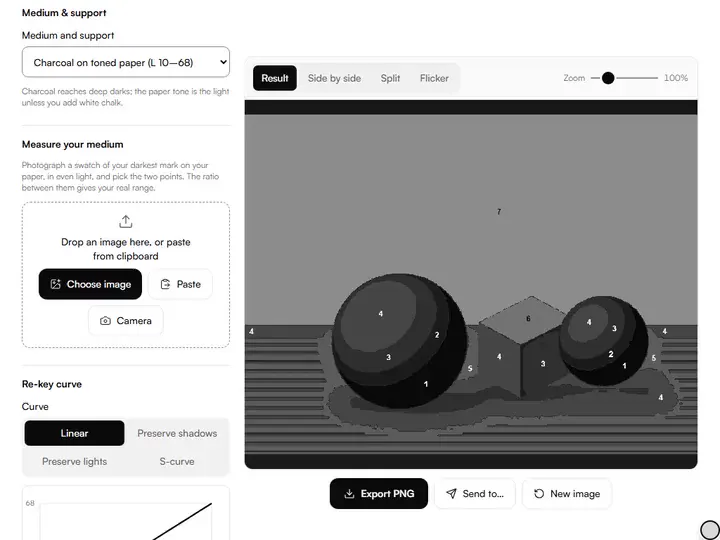
What the Value Range Compressor does
The Value Range Compressor fits a photo's range into a medium's range along a curve through your pins, and keeps local contrast and colour.
Photo range into medium range
The tool measures a photo's lightness span, from the 2nd to the 98th percentile of OKLab lightness so a few glints can't stretch it, and maps it onto the range your medium can reach. Among the value and tone tools for artists, it fits a reference to a medium before you plan or mix.
A curve through your pins
Pins are pairs of lightness values: this photo value becomes that painted value. The curve through them is a monotone cubic spline (Fritsch–Carlson), smooth and without overshoot, so a lighter tone in the photo is never painted darker. A pin that would reverse values is set aside and named.
Local contrast, kept
A plain squeeze flattens texture along with the range. With Keep local contrast, a guided filter splits the image into broad masses and fine detail; only the masses are compressed, and the detail is added back at the strength you choose. In our test on striped light and dark areas squeezed to less than half their range, a plain squeeze kept about half of the local contrast and the local method over 80%.
Your range from two swatches
The camera's exposure changes how bright both swatches look but not the ratio between them. For greys, OKLab lightness is the cube root of luminance, so your darkest value is the paper's lightness times the cube root of that ratio. A warning appears if the paper is overexposed in the photo.
Colour kept while values move
The re-key changes only OKLab lightness and keeps each pixel's hue and chroma, within the colours a screen can show.
Private, and kept in the link
Everything runs in your browser and the image is never uploaded. Medium, curve, pins, local contrast and the view live in the page address.
Artists who draw or paint from photographs
Draughtsmen, portrait painters and art teachers compress values when a drawing or painting is made from a photograph.
Draughtsmen
Measure your darkest graphite on your paper and plan the drawing inside that real range.
Portrait painters
Pin the skin's light value, compress around it, and keep the modelling with local contrast.
Art teachers
Hand out a numbered value map so a class mixes the same seven steps.
Why cameras exaggerate the range
A screen shows a photo with its own light; a drawing or painting only reflects light. The darkest dark is the blackest mark your medium makes, and the lightest light is the paper or white paint. Copying a photo's values one to one runs out of range and squeezes the midtones. Re-keying decides that compression in advance, as a singer transposes a song into a reachable key.
Measuring your own range
The presets are starting points, not measurements of your materials. Paper, pigment and light all move the limits. To measure yours, make the darkest mark your medium allows on your paper, photograph it with some bare paper beside it in even, indirect light, and drop the photo in Measure your medium. Put the dark point on the mark and the light point on the paper. Set the light swatch's lightness to what your paper should count as (95 is a white paper), and use the range.
Curves and pins
When the range narrows, some family of tones must give up separation. Linear shares the loss evenly; Preserve shadows gives more room to the darks, Preserve lights to the lights, and the S-curve to the midtones. Pins go further: fix the value that carries the picture, such as the light on a face, and the curve bends to keep it while the rest compresses around it.
Keeping local contrast
Compressing a whole photo evenly also compresses the small differences that describe texture: the weave of cloth, the grain of wood, the modelling inside a shadow. Keep local contrast compresses the arrangement of big masses and leaves the small differences at their original size (100%), or less, or more. Near the ends of the medium's range, detail is held back so it never goes darker than your darkest mark.
From numbered map to easel
The numbered map sorts the re-keyed image into five, seven or nine steps across your medium's range, removes specks, outlines each area and prints its step number where it fits best, 1 for the darkest. The key under the preview gives each step's lightness, ready to mix a value string. Clipped zones, shown on the re-keyed view, mark the photo's extreme tails, which become one flat value each. For more ways to flatten values, the value study maker posterizes with thresholds you set.
Further reading
The page below goes further into the ideas the Value Range Compressor works with, and opens on the site named beside it.
- Value structure and the limited palette of every medium (ArtisticMasterclass.com)
Tips from a working artist
From Sujith Puthran, artist and founder: what I actually do at the easel.
Measure your own materials once; it beats any preset.
Pin the focal area's key value first, then choose a curve.
Use about 100% detail for most subjects; less for a broader, simpler plan.
A red clipped zone means 'design this shape as one mass', not 'try harder'.
Why your picture stays on your device
The Range Compressor is a program your browser downloads and runs by itself. When you choose a picture, the browser reads it from your files and does the work on your own phone or computer; no copy is sent to this site or to anyone else, and what you export is saved straight from the browser. That is why there is nothing to upload and nothing to sign up for. The privacy page says what the site does collect.
Questions about the Value Range Compressor
The 5 questions below cover the method, ignored pins and swatch measurement, then the L numbers and the exported file.
The method
Why can't I copy the photo's values exactly?
You can't copy the photo's values exactly because your medium's darkest dark and lightest light are far closer together than the camera's. Every painting of a photo is already a compression; doing it deliberately beats discovering it halfway through.
Why was one of my pins ignored?
One of your pins was ignored because pins must sit inside the photo's measured span and the medium's range, and they must rise: a lighter photo value can't become a darker painted value, or the picture would invert there.
What does the swatch measurement assume?
The swatch measurement assumes even light across both swatches, no glare on the dark mark, and the paper not overexposed. It measures lightness only, so a coloured mark is read by how light it is.
Numbers and files
What do the L numbers mean?
The L numbers mean OKLab lightness from 0 (ideal black) to 100 (ideal white), with equal steps looking roughly even. The numbered map's steps count from 1, the darkest, like the site's value scales.
What does the PNG export contain?
The PNG export contains the re-keyed image, or the numbered map if that view is on, at full resolution. The red and blue clipped-zone overlay is never included.
Drop in a reference, measure your medium, pin what matters, and paint from the numbered map.
Free · No sign-up · Runs in your browser