Free Gesture Drawing Timer
Run timed gesture and figure drawing sessions with public-domain master figures, built-in form studies or your own references: fixed intervals or class-mode sequences, fullscreen, with breaks, shuffle and a practice history that stays on your device. Free, with no sign-up.
%22%2F%3E%3C%2Fsvg%3E)

%22%2F%3E%0A%20%20%20%3Cellipse%20cx%3D%22300%22%20cy%3D%22290%22%20rx%3D%22120%22%20ry%3D%2234%22%20fill%3D%22%23dedad2%22%2F%3E%0A%20%20%20%3Cellipse%20cx%3D%22300%22%20cy%3D%22290%22%20rx%3D%22120%22%20ry%3D%2234%22%20fill%3D%22none%22%20stroke%3D%22%23b7b2a8%22%20stroke-width%3D%223%22%2F%3E%3C%2Fsvg%3E)
%22%2F%3E%3C%2Fsvg%3E)
%22%2F%3E%3C%2Fsvg%3E)
%22%2F%3E%0A%20%20%20%3Ccircle%20cx%3D%22292%22%20cy%3D%22268%22%20r%3D%2292%22%20fill%3D%22url(%23stTop)%22%2F%3E%3C%2Fsvg%3E)

%22%2F%3E%0A%20%20%20%3Cellipse%20cx%3D%22444%22%20cy%3D%22446%22%20rx%3D%2242%22%20ry%3D%2258%22%20transform%3D%22rotate(-15%20444%20446)%22%20fill%3D%22%23d9d4cb%22%2F%3E%3C%2Fsvg%3E)
8 references ready: press Start session.
A page to draw the poses on, with a pen, a mouse or a finger.
Fixed interval.Pick a preset from 30 s to 10 min, or type a Custom interval up to 3,600 seconds, for 1–200 poses.
Class mode presets.Classic class, Quick warm-up and Long poses run groups of poses that step up from short holds to long.
Blur reveal.Each pose opens blurred for up to 3 seconds, so the big shapes register before any detail does.
Session summary.After the last pose, a grid shows each reference you drew with its time; skipped poses appear faded.
- Free
- No sign-up
- Runs in your browser: your image never leaves your device
What is a gesture drawing timer?
A gesture drawing timer is a tool that shows reference images one at a time for a set number of seconds, so each pose must be drawn before the next replaces it. The short limit leaves room only for a pose's line of action, weight and rhythm, the skill gesture practice trains.
How to use the Gesture Drawing Timer
The tool takes 6 steps, all on your device.
Pick your reference source: Master figures (public-domain figure studies and sculpture from three museums), the built-in shaded form studies, or your own images: a whole folder or single files, never uploaded.
Choose a session type: a fixed interval per pose, or class mode with a warm-up-to-long-pose sequence.
Set the pose length, number of poses and optional breaks: the total session time is shown before you start.
Turn on shuffle, grayscale, flip or blur reveal if you want them, then press Start session.
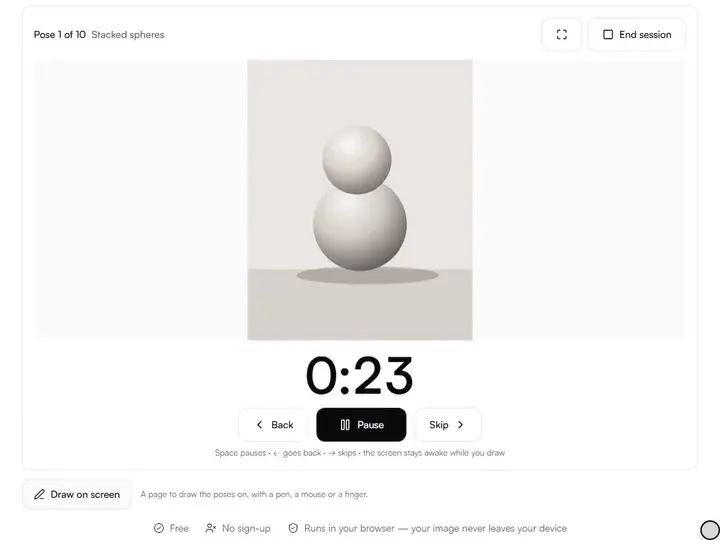
Draw. Space pauses, the right arrow skips, the left arrow goes back a pose. Where the browser supports it, the screen stays awake.
At the end, review the summary grid of what you drew: the pose count and drawing time are saved to your local practice history.
What the Gesture Drawing Timer does
The Gesture Drawing Timer plans a session before it starts and lets a countdown that does not drift decide when each pose ends.
The clock decides when to move on
The Gesture Drawing Timer turns a set of references into poses that advance by themselves, so each drawing ends when its time is up, finished or not. Among the drawing practice tools, it is the one built around a clock rather than a subject.
References that stay on your device
Reference images open from your device inside the page and are never uploaded. Up to 500 load at a time, sorted by file name.
A session planned before it starts
The pose count and total time, breaks included, update as the settings change, so a session can be fitted to the time you have.
A countdown that does not drift
Each pose's end time is fixed from the device clock when the pose begins, instead of being counted tick by tick. Pause holds the time remaining and resumes from it.
Settings that travel in the link
The interval, pose count, breaks, class preset and every option are written into the page address. A copied address reopens the same setup, without the images.
A stage built for drawing
The session stage runs from the keyboard, can fill the screen and asks the browser to keep the display awake. Sound cue marks each change with a short tone.
For artists who practice against the clock
Beginners, art students, illustrators and art teachers practise against its clock, alone or in a class.
Beginners
Beginners can start with 45-second poses of the eight Form studies before moving on to their own figure photos.
Art students
Art students can rehearse a life-drawing class with Classic class: ten 30-second gestures building to one 10-minute pose.
Illustrators
Illustrators can run Quick warm-up, twelve poses in eight minutes of drawing, before a day of client work.
Art teachers
Art teachers can project the Form studies fullscreen and share one link that carries the session settings.
Why the timer matters more than the reference
Gesture drawing is the practice of catching a pose's energy (its line of action, weight and rhythm) before your inner critic wakes up. Thirty seconds is not enough time to render, so you stop rendering and search for the big movement instead. That forced economy is the entire exercise.
Work shortest-first. A week of 30-second poses teaches you to commit; only then do two-minute poses teach you to place, and ten-minute poses to refine. Starting long trains hesitation, because a long pose forgives a wandering line.
Fixed intervals and class mode
A fixed-interval session is the daily drill: 30 or 45 seconds for pure gesture, one to two minutes to add proportion landmarks, five to ten minutes for studied quick sketches. At a standing easel, Break every inserts a rest that spares the shoulder and resets the eye.
Class mode follows the shape of a life-drawing session: a fast warm-up block to loosen the arm, medium poses to think, and a long pose to finish something. Quantity comes first and depth last.
Your references stay yours
Your own photos remain the most personal source: film stills, family, a sleeping dog.
The eight form studies, all lit from the upper left, suit light-logic practice and classroom projection. With no reference at all, the drawing prompt generator supplies a written subject instead, including timed gesture exercises among its figure prompts.
The options, and when each earns its place
Shuffle order is on by default because a familiar order breeds memorized drawings. Grayscale strips color so you read value structure instead of chasing hue. Flip horizontal makes a well-worn folder feel new: a mirrored pose shows mistakes your brain had stopped seeing.
Blur reveal is the classic squint made mechanical: in the blurred opening seconds only the big shapes and value masses show, which is where a drawing should start.
Making it a habit
Ten poses a day beats seventy on Sunday: gesture skill is pattern memory, and frequency builds it. The Recent sessions list is there to show the practice adding up, not to grade it.
A workable routine is five minutes of 30-second gestures before other work and one class-mode session a week. For a dated plan, the art challenge generator builds a 7-, 14-, 30-, 31- or 100-day drawing challenge and prints it as a calendar.
Further reading
The page below goes further into the ideas the Gesture Drawing Timer works with, and opens on the site named beside it.
- Gesture drawing fundamentals on Artistic Masterclass (ArtisticMasterclass.com)
Tips from a working artist
From Sujith Puthran, artist and founder: what I actually do at the easel.
Start every pose with the line of action, one curve for the whole figure, before adding anything else.
Stand up for 30-second poses if you can; drawing from the shoulder keeps lines loose where the wrist tightens.
Use blur reveal for a week if your gestures look stiff. It forces big shapes first.
Grayscale plus a two-value limit (paper and one marker) turns any session into notan practice.
Don't rewind a finished pose to fix it; the next pose is the fix. The skip button is for genuine emergencies only.
End on a pose you're proud of and stop: quitting on a win makes tomorrow's session easier to start.
Before a timed pose, find the gesture. The Line of Action Finder draws the line of action over a figure reference, with shoulder and hip tilts.
Why your picture stays on your device
The Gesture Timer is a program your browser downloads and runs by itself. When you choose a picture, the browser reads it from your files and does the work on your own phone or computer; no copy is sent to this site or to anyone else, and what you export is saved straight from the browser. That is why there is nothing to upload and nothing to sign up for. The privacy page says what the site does collect.
Questions about the Gesture Drawing Timer
The 8 questions below cover sessions and class presets, then references and history, then the screen and the classroom.
Sessions
What is a good first session?
A good first session is a fixed interval of 45 seconds, ten poses, shuffle on. When that feels easy, move to 30 seconds, then the Classic class preset.
How long is each class mode preset?
Each class mode preset has its own length: Classic class is 18 poses and 30 minutes of drawing, Quick warm-up is 12 poses and 8 minutes, and Long poses is 6 poses and 46 minutes. Break between groups, 30 seconds by default, adds a rest between groups.
What happens when I skip or go back a pose?
When you skip or go back a pose, the change is immediate: Skip ends the pose at once and marks it skipped in the summary. Back restarts the previous pose from its full time and drops its earlier record.
References and history
Where do the Master figures come from?
The Master figures come from the open-access collections of the Art Institute of Chicago, the Met and the Cleveland Museum of Art, searched live for public-domain figure studies and nudes. Each is credited and linked; we do not store or re-host them.
Where is my session history stored?
Your session history is stored in your browser's IndexedDB on this device: your last 30 sessions with pose counts and drawing time. Clearing site data removes it; nothing is synced or sent anywhere.
Are my reference photos uploaded anywhere?
No, your reference photos are not uploaded anywhere. Images are read straight from your device into the page. You can load the tool, go offline, and run a full session. Nothing is sent to a server, and there is no account.
Screen and classroom
Does the timer keep my screen on?
Yes, the timer keeps your screen on: while a session runs, the tool requests a screen wake-lock so the display doesn't sleep mid-pose. It releases automatically when the session ends. Browsers that don't support wake-lock simply behave as normal.
Can I use this for a classroom or workshop?
Yes, you can use this for a classroom or workshop. Fullscreen mode plus the form studies set is a safe projector combination, and the whole session runs from the keyboard.
Load a folder of references, set 30 or 45 seconds and draw only the line of action until the session ends.
Free · No sign-up · Runs in your browser