Free Underpainting Generator
Before colour, there is value. This tool turns any reference into a one-pigment underpainting in grisaille, brunaille, verdaccio, imprimatura or your own pigments, posterized into 3–7 value steps. Every step is a real mix in whole parts, predicted with Kubelka-Munk so the swatch shows the colour the paint will actually make, and the painting plan prints one page per pass with the shapes to paint. Exports PNG and PDF. Free, with no sign-up, and your picture never leaves your device.
Drop an image here, or paste from clipboard
Your image stays on your device. Nothing is uploaded.
JPG, PNG, WebP, GIF, AVIF or BMP
Real mixes per step.Each step is the simplest whole-part mix of pigment and white, or pigment and a darker paint, that reaches its value.
Painting plan PDF.The study with every recipe, then one page per pass, darkest first, with that pass's shapes in its colour.
Custom pigment pairs.Any one or two of 21 pigments, or paints saved in the paint mixing simulator, with a darker paint to deepen them.
Glaze over it.Send the finished study straight to the Glaze Layer Simulator to try colour glazes over it.
- Free
- No sign-up
- Runs in your browser: your image never leaves your device
What is an underpainting generator?
An underpainting generator turns a reference photo into a one-colour value study to paint the first layer from. This one renders grisaille, brunaille, verdaccio, imprimatura or custom pigments in 3 to 7 value steps, gives each step a whole-part mix predicted by Kubelka-Munk, and prints a page for every painting pass.
How to use the Underpainting Generator
The tool takes 6 steps, all on your device.
Drop in your reference photo (or tap a sample); the study appears in grisaille with 5 value steps.
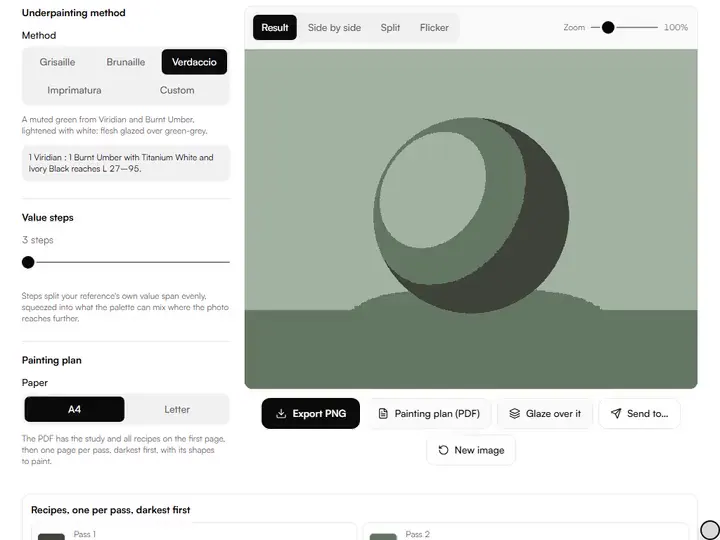
Pick a method: Grisaille (Ivory Black), Brunaille (Burnt Umber), Verdaccio (Viridian with Burnt Umber), Imprimatura (Burnt Sienna), or Custom to choose one or two pigments, their parts and a darker paint to deepen them.
Set Value steps between 3 and 7. The note under the method shows how far the palette reaches, from its darkest mix to white.
Read the recipes under the study, darkest first: each pass has its swatch, its mix in whole parts, the value it aims for and the value the mix reads.
Download the Painting plan (PDF) for the study, the recipes and one page per pass; Export PNG for the study alone.
Press Glaze over it to open the study in the Glaze Layer Simulator and try colour glazes on top.
What the Underpainting Generator does
The Underpainting Generator mixes one pigment with Kubelka-Munk, gives recipes in whole parts, and plans the layer pass by pass.
Mixed with Kubelka-Munk
Mixes are predicted with spectral.js, a Kubelka-Munk model on reflectance curves, so each swatch shows the hue and chroma a tint really has, not a tinted grey. Among the value and tone tools for artists, this is the one that ends in a first layer you can mix and paint.
Whole parts you can measure
Recipes use at most 12 parts in all, such as 3 Titanium White : 4 Burnt Umber. When two mixes land within half a step of the target, the one with fewer parts wins. In our tests every brunaille target the palette can reach was matched within 2 L.
Values the palette can reach
A palette spans from its darkest mix to white: Ivory Black and white reach about L 27–95 on our pigment data. Steps split the photo's own value span evenly, and where the photo reaches past the paint, the steps are squeezed into the paint's range and the page says so.
Pass by pass
Each page of the plan shows the shapes for one pass in its mix, the shapes from earlier passes in pale grey and the rest blank, with outlines to find your place.
Settings kept in the link
Method, pigments, parts, darkener, step count and paper are written into the page address, so a bookmark reopens the same palette.
Stays on your device
The study, the mixes and the PDF are all made in your browser; the reference is never uploaded.
Painters planning a first layer in one pigment
Working painters, art students, beginners and art teachers plan a first layer in one pigment with it.
Working painters
Working painters can set Brunaille at 5 steps for a portrait and premix every pass from the plan.
Art students
Art students can compare Grisaille at 3 and 7 steps to see what the step count changes.
Beginners
Beginners can start in Grisaille, where neutral grey leaves value as the only thing to judge.
Art teachers
Art teachers can print one painting plan per student, so each pass is a short, clear exercise.
Why underpaint at all?
An underpainting solves the hardest problem first, while the paint is thin and the decisions are cheap: where the values go. The classical methods set the light and shadow structure in one pigment before colour, and differ mainly in the temperature of the note they set under everything that follows.
Working from a posterized study keeps you honest. The photo whispers that there are a hundred greys in that cheek; the study says there are three, and dares you to mix exactly them.
The methods and their pigments
Grisaille is Ivory Black and white: pure value, with no temperature agenda. Brunaille is Burnt Umber and white, deepened with Ivory Black; it suits portraits and warm-lit subjects. Verdaccio is a muted green-grey, here Viridian and Burnt Umber in equal parts, lightened with white; flesh glazed over it is tempered by the green. Imprimatura here is a warm key in Burnt Sienna, deepened with Burnt Umber so the darks stay warm.
Custom lets you build any pair, such as Ultramarine Blue with Burnt Sienna for a cool chromatic grey, and choose what deepens it. Paints you saved with their own colours in the paint mixing simulator appear in the lists as well.
Why a mix model, not a tinted grey
Mixing white into a pigment does more than lighten it: in this model, Burnt Umber tints lose chroma and drift from red-brown toward a yellowish grey as white is added. A study painted in a tinted grey promises colours the palette cannot make. Here every swatch is the predicted colour of its actual recipe, and the value it reads is shown beside the value it aims for, so you know where the paint falls short.
The pigment colours are masstone approximations for screens, normalized from published pigment references such as handprint.com, and brands differ in tinting strength. Treat each recipe as a first mix and correct the puddle by eye against the swatch.
Reading the painting plan
The first page shows the whole study and the recipe list. Each following page is one pass, darkest first: its shapes are filled with the pass's colour, the shapes from earlier passes are pale grey, and everything lighter is blank, with outlines between all steps. Mix the pass, paint its shapes, and turn the page.
Three steps give the classic structure of shadow, light and one transition. Seven approach continuous tone and help where form turns gradually, as in skin or drapery. For breaks you drag by hand on a histogram, try the value study maker.
From study to glaze
Once the underpainting reads correctly from across the room, colour goes over it in thin, transparent layers. Glaze over it opens the study in the glaze layer simulator, where you can try glazes over its values before committing paint.
Further reading
The page below goes further into the ideas the Underpainting Generator works with, and opens on the site named beside it.
- Underpainting methods and the classical painting process (ArtisticMasterclass.com)
Tips from a working artist
From Sujith Puthran, artist and founder: what I actually do at the easel.
Three steps is a composition test, five a working study, seven a near-continuous rendering; choose on purpose.
Mix the darkest and lightest passes first and use them as palette anchors for everything between.
Judge swatches against your actual puddles in the light you paint in, not against the screen alone.
If the plan says the photo reaches past the palette, add a darker paint under Custom, or accept the lighter darks as the key of the painting.
Use the Split view to sweep across the reference and check that every step boundary lands on a real value change.
Why your picture stays on your device
The Underpainting is a program your browser downloads and runs by itself. When you choose a picture, the browser reads it from your files and does the work on your own phone or computer; no copy is sent to this site or to anyone else, and what you export is saved straight from the browser. That is why there is nothing to upload and nothing to sign up for. The privacy page says what the site does collect.
Questions about the Underpainting Generator
The 5 questions below cover the methods and the Imprimatura option, then how the mixes and their L numbers are worked out.
Methods
Which method should I start with?
Start with the grisaille method. Neutral grey keeps the focus purely on value. Move to brunaille for warm subjects, verdaccio once you glaze flesh tones, and a custom pair when you want the underpainting to share a pigment with the colour layers.
How does the Imprimatura option differ from a real imprimatura?
A real imprimatura is a thin, transparent wash of colour over the whole ground before painting. The Imprimatura option paints your posterized study in Burnt Sienna tints and shades instead.
Mixes
How are the mixes worked out?
The mixes are worked out by trial: for each step, the tool tries the base alone, white alone, the darker paint alone, and every whole-part pair of base with white or with the darker paint up to 12 parts. Each is mixed with Kubelka-Munk through spectral.js, and the one closest in value wins, with fewer parts preferred when two are close.
Why does a pass read a little lighter or darker than its target?
A pass reads a little lighter or darker than its target because whole parts cannot hit every value exactly. The recipe list shows both numbers, so you can nudge the puddle a touch lighter or darker while you mix.
What does the L number mean?
The L number means perceptual lightness on a 0–100 scale (OKLab L), not the artist's 1–10 value scale. Equal steps look roughly equally spaced to the eye.
- Pigment masstones: handprint.com/HP/WCL/waterfs.html · checked 2026-09-29
- Pigment masstones: handprint.com/HP/WCL/pigmt1.html · checked 2026-09-29
Drop in a reference and get a study with a real mix for every value step and a page for every pass.
Free · No sign-up · Runs in your browser