Free Drawing Scale & Enlargement Calculator
Scale any reference to any canvas, paper or wall with the proportions locked: the exact scale factor, a matched grid of round squares, your photo gridded or printed at actual size, and inches as fractions. Exports PDF. Free, with no sign-up, and it runs in your browser.
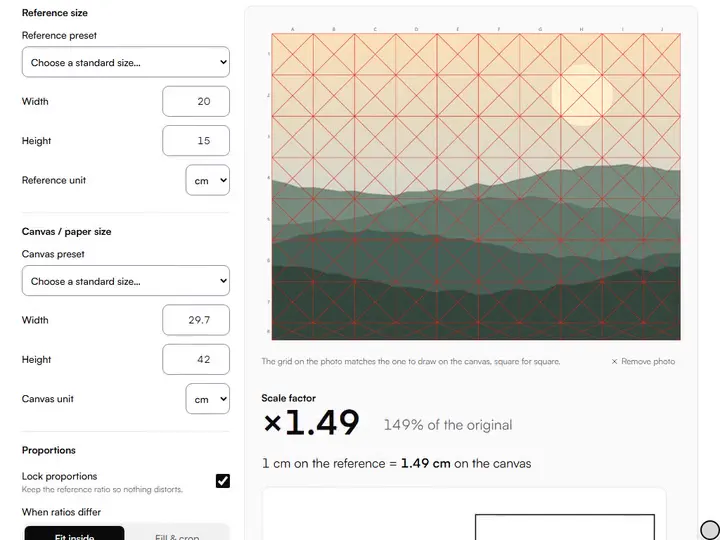
Grid your reference photo (optional)
Drop an image here, or paste from clipboard
Scale factor
×2.00
200% of the original
1 cm on the reference = 2 cm on the canvas
8 × 12 squares
On the canvas: squares of 5 cm. On the reference: 2.5 cm.
- Reference
- 20 × 30 cm · ratio 2:3
- Canvas / paper
- 40 × 60 cm · ratio 2:3
- Drawn size on canvas
- 40 × 60 cm
- 5 cm on the reference becomes
- 10 cm
Send to…
Open this result in another tool. It stays on your device.
Grid method.Suggests round squares for the canvas, about ten along the long side, and gives each square's size on the reference.
Lock proportions.Lock proportions keeps one factor for both sides; Fit inside or Fill & crop decides which side sets it when ratios differ.
Transfer a measurement.Type any length taken on the reference into On reference and read its size on the canvas in the same unit.
Export PNG or Copy summary.Export PNG saves a scale sheet to pin beside the easel; Copy summary puts the same figures on the clipboard as text.
- Free
- No sign-up
- Runs entirely in your browser
What is a scale drawing calculator?
A scale drawing calculator is a tool that finds the single multiplier between a reference and a larger or smaller canvas, so every measurement keeps its proportion. This one works in mm, cm, inches or pixels, reports the factor and the drawn size, converts any length you measure, and says how much to crop when the ratios differ.
How to use the Drawing Scale & Enlargement Calculator
The tool takes 6 steps, all on your device.
Enter your reference width and height, or pick a standard size from the preset list.
Enter your canvas or paper size the same way: presets cover A-series paper, US paper and common canvas formats.
Keep “Lock proportions” on so nothing distorts; choose “Fit inside” or “Fill & crop” for how to handle mismatched ratios.
Read the scale factor (for example ×2.50) and the drawn size on your canvas.
Type any measurement from the reference into the transfer box to get its size on the canvas: an eye width, a head length, a shadow's edge.
Add your photo to draw the matching grid on it, then save the gridded reference or print it at actual size on A4 or Letter sheets.
What the Drawing Scale & Enlargement Calculator does
The Drawing Scale & Enlargement Calculator finds one factor for every length, measures the crop in advance, and reports unused canvas.
One factor for every length
The calculator reduces an enlargement to one scale factor, shown as ×2.50 and as a percentage of the original. Measuring by a single factor is the scaling method among the drawing practice tools: it holds every proportion, so a circle stays a circle at any size. A 30 × 40 cm study on a 60 × 80 cm canvas comes out at exactly ×2.00.
The crop measured in advance
The crop note appears whenever the ratios differ with proportions locked. It gives the length and percentage to cut from the reference width or height, and the share for each side.
Unused canvas reported
Fit inside mode reports the strip of canvas the drawing leaves empty. A 20 × 30 cm reference on a 16 × 20 in canvas leaves 2.67 in of unused width.
Inches as fractions, walls in feet
Inch results also read as tape-measure fractions to the nearest 1/16, and metres and feet cover murals, where the suggested squares grow to wall size.
Your photo, gridded or at actual size
Add a reference photo and the matching grid is drawn on it, columns lettered and rows numbered. Save it as a PNG, or print the photo at its drawn size across sheets with the canvas grid and every square named.
Sizes saved in the address
Every size, unit, mode, measurement and DPI value is stored in the page address, so a bookmark reopens the same calculation.
For carrying a small study up to full size
Working painters, draughtsmen and art teachers carry a small study up to full size with its figures.
Working painters
Canvas presets such as 16 × 20 in or 50 × 70 cm give the factor for scaling a study up to the stretched canvas.
Draughtsmen
Transfer a measurement carries landmark lengths, a head height or an eye line, onto the enlarged drawing.
Art teachers
An A4 reference on A2 paper reads exactly ×2.00, and the PNG scale sheet can hang beside the exercise.
Why a scale factor beats guessing
Enlarging a drawing is where proportions quietly fall apart: judge eye-to-nose on a 20 cm reference, place it on a 60 cm canvas, and every small misjudgment compounds. A scale factor turns each judgment into one measurement and one multiplication. Measure 3.5 cm on the reference, multiply by 3, and mark 10.5 cm on the canvas; in inches, 1.5 in becomes 4.5 in. The factor never drifts, so neither does the drawing.
The factor is canvas size divided by reference size on the side that limits you, so an 8 × 10 in study on a 24 × 30 in canvas gives ×3.
When the ratios don't match
A 2:3 photo and a 4:5 canvas share no single factor: the drawing either leaves empty canvas or loses part of the reference. Fit inside keeps the whole reference and leaves a strip unused; Fill & crop covers the canvas and pushes the overflow past its edge.
A 20 × 30 cm reference on a 40 × 50 cm canvas needs 5 cm (16.67%) cut from the reference height, 8.33% from each end. Cropping the reference itself first settles the question before any drawing: crop to canvas size sets a frame at the canvas ratio that you drag across the photo until the composition sits right.
Transferring measurements in practice
Measure anything on the reference with a ruler or dividers, type it in, and read off the canvas length. Head length, eye spacing, the height of a jar against the width of its shadow: each becomes a checkable number.
Transfer a handful of landmarks first: the subject's total height and width, the eye line or horizon, and the width of the largest shape. With those placed lightly, the drawing's skeleton is right before detail begins. Then measure each new shape against one already on the canvas, so errors do not stack up.
Pixels, prints and DPI
A digital reference is sized in pixels, which become physical only through a resolution. Set Image DPI to the resolution you will print at: a 2400 × 3000 px file at 300 DPI is an 8 × 10 in sheet (203.2 × 254 mm), and the tool treats it exactly like one.
When the enlarged reference is bigger than your printer's paper, the large print tiler splits it across A4, A3, Letter or Legal pages at true physical size.
Further reading
The page below goes further into the ideas the Drawing Scale & Enlargement Calculator works with, and opens on the site named beside it.
- Proportion and measuring techniques for realist drawing (ArtisticMasterclass.com)
Tips from a working artist
From Sujith Puthran, artist and founder: what I actually do at the easel.
Write the scale factor on the corner of your canvas in pencil. Mid-drawing you will not want to recalculate it.
Transfer three to five landmark measurements before any detail: subject height, subject width, eye-line height. If those are right, everything placed relative to them tends to stay right.
When ratios differ, decide the crop on the reference, not on the canvas. Tape strips of paper over a printed reference to preview the cropped composition.
For big enlargements (×4 or more), work in two stages: scale to an intermediate drawing first, correct it, then scale again. Small errors grow with the factor.
If you use a proportional divider, set it once from the calculator's factor and leave it locked for the whole session.
Measure with a consistent unit. Mixing centimeters on the reference with inches on the canvas is how perfectly good arithmetic produces wrong drawings.
For a wall, the Mural Planner adds what a scale calculation leaves out: squaring-up lines, projector distance and paint for each color.
Questions about the Drawing Scale & Enlargement Calculator
The 7 questions below cover enlargement, mismatched proportions and pixels, then the scale factor, grids, murals and reductions.
Using it
How do I enlarge a drawing without losing proportions?
To enlarge a drawing without losing proportions, lock the proportions, get the scale factor from the calculator, and multiply every measurement you transfer by that factor. The factor keeps the reference's ratio exact, so the drawing is enlarged proportionally and nothing distorts.
My reference and canvas have different proportions. What do I do?
When your reference and canvas have different proportions, either crop the reference to the canvas ratio or fit the whole reference inside the canvas and accept a margin. For a crop, the calculator tells you exactly how much to remove and from which side. Never stretch: it bends every shape.
How do pixels work here?
Pixels work here by being converted to physical size through the Image DPI you set, which defaults to 300. Once converted, pixel references scale like any other size.
The method
What does the scale factor actually mean?
The scale factor is the multiplier between reference and canvas. ×2.50 means everything on the canvas is two and a half times larger than on the reference: 1 cm measured on the reference becomes 2.5 cm on the canvas.
Is this the same as the grid method?
Not only: this calculator does the grid method and scaling by a factor. The grid scales square by square; the factor scales by measurement. Use the grid for placement and transferred measurements to check it.
Can I use this for murals or very large work?
Yes, you can use this for murals and very large work. Enter the wall in metres or feet; the suggested squares grow with it, for a chalk or string grid. Check key lengths too, because a small error on the reference grows by the full factor on the wall.
Does a reduction work the same way?
Yes, a reduction works the same way. A canvas smaller than the reference gives a factor below ×1, such as ×0.50 (50% of the original), and every transferred measurement shrinks by that factor.
Enter the two sizes, note the factor, and place your first landmark measurement before any detail goes down.
Free · No sign-up · Runs in your browser