Free Live Camera Studio
Point your phone or webcam at a still life, a landscape or a model and see it live as values, notan, posterized shapes, warm and cool, edges or through a black mirror. Two probes compare the values of any two areas, a viewfinder frames your canvas, and a frozen frame goes straight into another tool. The video never leaves your device. Exports PNG. Free, with no sign-up.
Point your camera at the subject.
Watch it live in grayscale, notan, posterize, black mirror, colour isolate, edges or warm and cool, and compare the values of any two areas. Press Start camera to begin.
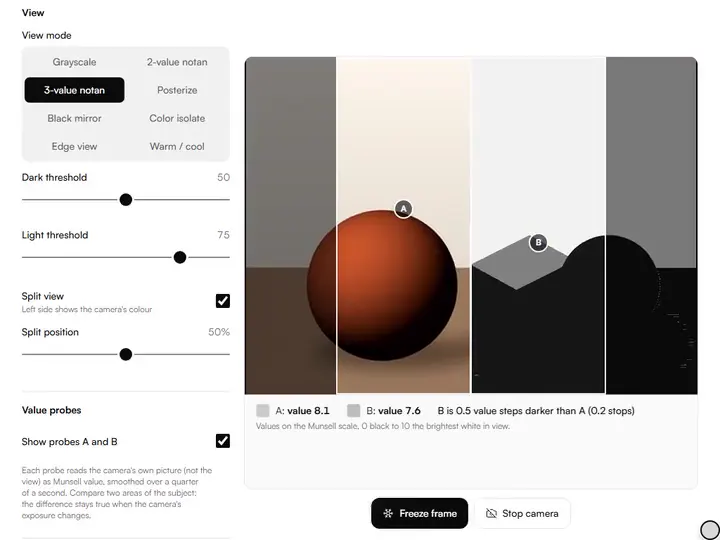
Two value probes.A and B read the camera's picture as Munsell value and say how many steps apart they are.
Warm / cool and split.Warm colours tinted orange and cool ones blue, with the camera's colour beside it in split view.
Canvas viewfinder.Frame the view at your canvas's ratio; a frozen frame is cropped to it.
Send to a tool.A frozen photo goes straight into the Value Checker, Notan Generator and others on this device.
- Free
- No sign-up
- Runs entirely in your browser
What is a live value viewer?
A live value viewer is a camera view that shows the scene in front of you as light and dark values instead of colours, updating as the light or the subject moves. This one adds notan, warm and cool, and two probes that measure the value difference between any two areas.
How to use the Live Camera Studio
The tool takes 5 steps, all on your device.
Press Start camera and allow camera access when the browser asks.
Pick a view: grayscale, 2- or 3-value notan, posterize, black mirror, colour isolate, edges or warm / cool. Split view keeps the camera's colour on the left.
Drag probes A and B onto two areas of the subject, or move them with the arrow keys, and read how many value steps apart they are.
Choose your canvas ratio in Viewfinder to frame the view as you will paint it.
Press Freeze frame (or F with the stage focused), then download the view or the colour photo, or send the photo to the Value Checker, Notan Generator, Value Study Maker or Palette from Image.
What the Live Camera Studio does
The Live Camera Studio reads values from life through the camera, with probes that measure and a warm–cool reading, and records nothing.
Values from life
The views are computed frame by frame, so the value pattern changes the moment you move a lamp, turn the subject or step sideways. It brings the checks of the value and tone tools for artists to the subject itself, before any reference photo exists.
Probes that measure, not guess
Each probe averages a small square of the camera's own picture, before any view is applied, in linear light, converts it to Munsell value by the ASTM D1535 relation, and smooths it over a quarter of a second so the number holds still. The pair is compared in value steps and in photographic stops.
True relative to each other
A camera sets its own exposure, so a single reading shifts when it does. Both probes share one exposure, so the difference between them holds. Where the browser allows it (Chrome on many Android phones), Lock exposure and Lock white balance hold the camera still.
Warm and cool, measured
The warm / cool view measures each colour along a warm-to-cool axis in the OKLab colour space, through red-orange at one end and blue-green at the other, and tints it in proportion to how colourful it is, so greys stay grey.
Keyboard and screen reader friendly
Probes move with the arrow keys (Shift for bigger steps) and say where they are; with the stage focused, F freezes or resumes and S turns the split view on or off. The readout is text, not only colour.
Nothing recorded, nothing sent
The video goes from the camera to a canvas on your device and is never uploaded or recorded. Send to hands a single frozen photo to another tool through this browser's storage.
For artists who work from life
Still-life painters, plein-air painters and art teachers point it at the subject while they work from life.
Still-life painters
Put A on the lit side of an apple and B in its shadow and see whether the step matches your mixes.
Plein-air painters
Frame the scene at your panel's ratio and switch on Plein-air mode so the screen stays awake.
Art teachers
Show a class how far apart two values really are, in numbers, while the light changes.
Why look at the world through value views?
Colour hides value, which is why you look at the world through value views. A still life that looks rich in colour can read as one flat middle value once the colour is gone, and it will read that way on the canvas too. Grayscale removes the distraction, and the notan views test whether the design holds as a few flat shapes. Because the view is live, you can move the lamp and watch the pattern reorganise before the first stroke.
Measuring two values against each other
The eye judges a value by its neighbours, which is why a shadow looks darker next to a light than it is. The probes remove that: put A on one area and B on another and the readout gives each on the Munsell scale, 0 for black to 10 for the brightest white in view, and the gap between them. A two-step gap between a light and its shadow is a different painting from a four-step one.
Stops are the photographer's unit: each stop is half or double the light. The readout gives both, because value steps match what a painter mixes and stops match what a light meter says.
Warm and cool
Temperature is relative: a grey can look cool beside orange and warm beside blue. The warm / cool view shows where the scene actually leans, so you can see whether the light is warm and the shadows cool, or the other way round. Split view keeps the colour on the left to compare.
What the other views are for
Posterize, set to the number of value families you plan to mix, shows where two families are secretly one. Colour isolate finds every place a local colour appears, Edge view shows which boundaries could carry the drawing as line, and Black mirror sinks halftones into their masses. For a photo, with colour kept and a convex option, use the black mirror claude glass.
Freeze, frame and carry
Set the viewfinder to your canvas's ratio and the view outside it dims, so you compose the painting you will make. Freeze frame keeps the moment and crops it to the frame. Download view saves the processed image; Download photo saves the colour picture. Send to opens another tool with the photo already loaded: the value checker reads any point on its 1–10 scale.
Further reading
The page below goes further into the ideas the Live Camera Studio works with, and opens on the site named beside it.
- Value and notan: the foundation every painting stands on (ArtisticMasterclass.com)
Tips from a working artist
From Sujith Puthran, artist and founder: what I actually do at the easel.
Start in Grayscale, then 3-value notan: the notan is where composition problems show.
Put probe A on your lightest light and compare everything else to it.
Lock exposure, where your phone allows it, before you compare values across a whole session.
Freeze early; live shadows and live models don't wait.
Questions about the Live Camera Studio
The 5 questions below cover probe values, exposure lock and the phone's camera, then frames sent on and privacy.
Using it
Why do the probe values change when I point the camera elsewhere?
The probe values change when you point the camera elsewhere because the camera adjusts its exposure to the scene, so absolute values move. The difference between A and B stays the same, because both are measured in the same frame. Lock exposure, where available, stops the drift.
Why is Lock exposure greyed out?
Lock exposure is greyed out when the camera does not allow it: the browser only offers it for cameras that do, mostly Android phones in Chrome. Laptop webcams and iPhones usually don't.
Which camera does it use on a phone?
On a phone it uses the rear camera first. On a device with several cameras, a Camera menu appears once the stream is live.
Frames and privacy
What does Send to pass on?
Send to passes on the frozen colour photo, cropped to the viewfinder if one is on, handed over through this browser's storage. Nothing is uploaded.
Does my video get uploaded or stored anywhere?
No, your video does not get uploaded or stored anywhere. The stream is processed on your device. Nothing is kept unless you freeze a frame and choose to download, copy or send it.
Start the camera, put the probes on a light and its shadow, and freeze the frame when the pattern looks right.
Free · No sign-up · Runs in your browser