Free Practice Log & Streaks
An art practice tracker that keeps your sessions on your device: minutes, medium, subject, a note and a photo of the work. It shows the year as a heatmap, the weeks against a goal you set, and a streak that allows rest days. It can fill itself from the Gesture Drawing Timer. Exports CSV, JSON and ZIP. Free, with no sign-up.
This week
0 min
0 days practised.
Streak
No streak running. Practise today to start one; 2 rest days a week will not break it.
This year: 0 min.
| Week of | Mon | Tue | Wed | Thu | Fri | Sat | Sun |
|---|
| Week of | Minutes | Days practised |
|---|---|---|
| 13 October 2025 | 0 | 0 |
| 20 October 2025 | 0 | 0 |
| 27 October 2025 | 0 | 0 |
| 3 November 2025 | 0 | 0 |
| 10 November 2025 | 0 | 0 |
| 17 November 2025 | 0 | 0 |
| 24 November 2025 | 0 | 0 |
| 1 December 2025 | 0 | 0 |
| 8 December 2025 | 0 | 0 |
| 15 December 2025 | 0 | 0 |
| 22 December 2025 | 0 | 0 |
| 29 December 2025 (this week) | 0 | 0 |
Period
No sessions in this period.
Opening your log…
Fills itself.Finished Gesture Drawing Timer sessions are added by themselves once you turn that on. It is off until you do.
Rest days allowed.Choose how many days a week you may miss. The streak holds through them and counts only the days you practised.
The year at a glance.A heatmap of the last 53 weeks, the last twelve weeks against your goal, and your minutes by medium.
Yours to keep.Kept on your device with no account. Export a spreadsheet file or a backup with the photos whenever you like.
- Free
- No sign-up
- Runs entirely in your browser
What is an art practice tracker?
An art practice tracker is a record of when you practised and for how long, kept so that your habit is seen and not guessed at. A good one also notes the medium and the subject, adds up the weeks, and shows at a glance which days of the year had work in them.
How to use the Practice Log & Streaks
The tool takes 6 steps, all on your device.
Enter the Date and the Minutes practised. Add the Medium, Subject, a Note and a Photo of the work if you like.
Choose Add entry.
Set a Weekly goal in minutes, and how many Rest days a week the streak should allow.
Turn on Add Gesture Drawing Timer sessions to have the timer write its finished sessions here.
Read This week, the Streak, the year's heatmap, the last twelve weeks and the split By medium.
Choose Export CSV for a spreadsheet, and Back up the log now and then.
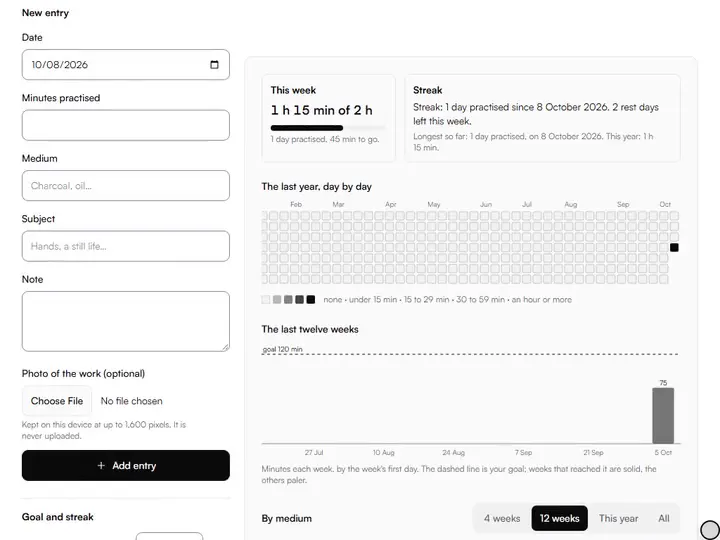
What the Practice Log & Streaks does
Practice Log & Streaks keeps entries made for art, with a goal in minutes, a medium, a photo of the work, and no levels or badges.
Entries made for art
Each entry holds the date, the minutes, the medium, the subject, a note and an optional photo of the work. Among the drawing practice tools, it is the one that remembers what the others did.
A goal in minutes
Set a weekly goal and see how much of it this week has done, and which of the last twelve weeks reached it.
By medium
See where the time went: charcoal against oil against ink, over four weeks, twelve weeks, the year or everything.
A photo of the work
Attach a photo to an entry. It is reduced to 1,600 pixels and kept on your device, next to the note about it.
Spreadsheet in, spreadsheet out
Export every session as CSV, and bring a CSV or JSON file back in. Importing the same file twice adds nothing twice.
No levels, no badges
The log counts minutes and days. There are no points, ranks or leaderboards, and nothing is shared with anyone.
How it compares with free habit trackers
Each was opened on 2 October 2026 and a habit called Drawing was started. What the page showed was read; nothing is claimed about what was not opened.
| Feature | This tool | Free Habit Tracker | Streakfreak |
|---|---|---|---|
| Opens with no account, data kept in the browser | Yes | Yes | Yes |
| What one entry records | Minutes, medium, subject, note, photo | A tick for the day, and a note | An amount in a unit you name |
| Takes sessions from a drawing timer | Yes | No | No |
| Days off that do not break the streak | A number of rest days a week | Fixed weekdays you choose | Daily goal |
| Year heatmap | Yes | Yes | Yes |
| Weekly chart against a goal | Yes | Charts are in a paid plan | Not seen |
| Export | CSV, JSON, backup with photos | JSON backup | JSON and CSV |
| Other servers the page contacted | None | 3 | 1 |
DŌRI, an art practice tracker for iPhone, and Practice Tracker, a paid tracker for musicians that asks for a sign-in, were not tried.
For anyone building a practice habit
Students, self-taught artists and working artists build a practice habit with the log.
Students
Show a tutor, or yourself, how many hours went into drawing this term and on what.
Self-taught artists
Keep a daily drawing streak that survives a rest day, and see which media you have been avoiding.
Working artists
Keep study time separate from paid work, with a weekly goal that is yours to set.
A drawing practice tracker that fills itself
Most trackers depend on you remembering to tick a box. This one is connected to a tool you already practise with. Turn on Add Gesture Drawing Timer sessions and every session you finish in the gesture drawing timer is written to the log with its drawing time and how many poses you completed. The switch is off until you turn it on, and turning it off stops it at once.
If you used the timer before the log existed, the log offers to bring in the timer's past sessions. It asks first, and it never adds the same session twice.
A streak with rest days in it
A strict daily streak breaks the first time you are ill or travelling, and a broken streak is a poor reason to stop drawing. Here you choose how many rest days a week are allowed, from none to six. With two, five days of practice in a week keep the streak alive, whichever five they are.
The streak counts the days you practised, not the days that passed. Today is never counted as missed while it is still today. Weeks start on Monday or Sunday, as you choose. Used as an art habit tracker, that is the number to watch; used as a daily drawing streak, set the rest days to none.
Reading the three pictures
The heatmap shows the last 53 weeks, one square a day: empty for nothing, then four shades for under 15 minutes, under 30, under an hour, and an hour or more. The bars show the minutes in each of the last twelve weeks, with your goal as a dashed line. By medium splits a period you choose. Each picture has a table behind it with the same numbers, for a screen reader.
When the log shows a medium you have neglected, the drawing prompt generator can hand you a subject for it.
Where the log is kept
The art practice log is stored in this browser on this device. Nothing is uploaded and there is no account. Clearing the browser's site data removes it, so Back up the log writes every session, photo and setting into one file, and the page reminds you after two weeks of new sessions without a backup.
Export CSV writes one row a session with the columns date, minutes, medium, subject, note, source and started. To bring sessions in from a spreadsheet, keep a first row with those names; only date, as year-month-day, and minutes are needed.
What it leaves out
It does not remind you to practise: there are no notifications. It does not sync between devices; move the log with a backup file. Photos are in the backup file only, not in the CSV or JSON. Only the tools listed under From your other tools write to it, each when you switch it on.
Further reading
The page below goes further into the ideas the Practice Log & Streaks works with, and opens on the site named beside it.
- Drawing and painting lessons on Artistic Masterclass (ArtisticMasterclass.com)
Tips from a working artist
From Sujith Puthran, artist and founder: what I actually do at the easel.
I write the subject down, not only the minutes. Three months on, 'forty minutes of hands' tells me more than a filled square.
I set the goal lower than my best week. A goal I meet most weeks keeps me drawing; one I miss teaches me to ignore it.
Questions about the Practice Log & Streaks
The 7 questions below cover streaks, the timer's entries, past sessions and other habits, then your data and its export.
Using it
How does the streak work?
The streak works by counting the days you practised in a row, forgiving up to the number of rest days you allow in each week. One missed day more than that in a week ends it. Today does not count as missed until tomorrow.
Does the Gesture Drawing Timer log by itself?
Only after you turn on Add Gesture Drawing Timer sessions, here or in the timer's options. It is off until you turn it on.
Can I log a session from last week?
Yes, you can log a session from last week. Set the Date to any day up to today. The heatmap, the week totals and the streak are worked out again from the whole log.
Can I use it as a drawing habit tracker for other things?
Yes, you can use it as a drawing habit tracker for other things. It records any practice measured in minutes: drawing, painting, sculpture, calligraphy. Type your own medium if it is not in the list.
Your data
Is my log uploaded anywhere?
No, your log is not uploaded anywhere. It is kept by your browser on your device, the page contacts no other server, and it works with the network off once it has loaded.
Can I open the export in a spreadsheet?
Yes, you can open the export in a spreadsheet. Export CSV gives a file that Excel, Numbers, LibreOffice and Google Sheets open directly, one row a session.
What happens if I clear my browser data?
If you clear your browser data, the log goes with it. A backup file brings everything back, photos included, which is why the page reminds you to make one.
Log a session, or let the timer log it for you. Kept on your device, with no account.
Free · No sign-up · Runs in your browser