Free Calligraphy Guideline Generator
Print calligraphy guidelines ruled for your own pen. Give the width of a broad-edge nib, or the x-height for a pointed pen, and the page draws the baseline, waistline, ascender and descender lines and the slant lines, with a nib ladder and no watermark. Exports PDF. Free, with no sign-up, and it runs in your browser.
A 3.8 mm nib: x-height 19 mm, ascenders 11.4 mm, descenders 11.4 mm. 6 rows of writing on an upright A4 page. Slant 5° from upright.
The heavy line is the baseline, the solid line above it the waistline, and the dashed lines the ascender and descender lines. The black squares are the nib ladder: hold your nib against them to check its width. Print at 100% and measure the 50 mm line at the foot.
Ruled from your nib.Every line is counted from the width you enter, so the sheet fits the pen in your hand.
Broad-edge and pointed pen.Five broad-edge hands by nib widths, and Copperplate by x-height and ratio.
No watermark.Nothing is printed across the lines you write on. One small note at the foot.
Nothing uploaded.The sheet is drawn on your device. No account.
- Free
- No sign-up
- Runs entirely in your browser
What are calligraphy guidelines?
Calligraphy guidelines are the ruled lines that keep letters the same height and slant. Each row has a baseline the letters sit on, a waistline at the top of the small letters, and lines for ascenders and descenders. For a broad-edge pen the spacing is counted in nib widths: Italic is usually written five nib widths high.
How to use the Calligraphy Guideline Generator
The tool takes 6 steps, all on your device.
Choose the Hand: Italic, Foundational, Uncial, Gothic, Roman capitals or Copperplate.
Enter the Nib width in millimetres, or the Letter height for a pointed pen.
Change the Ascender, x-height and Descender if your book or teacher gives other figures.
Set the Slant from upright and how far apart the slant lines are.
Choose the Paper, turn it Sideways if you like, and set the Margin.
Save the Guide sheet (PDF) and print it at 100%.
What the Calligraphy Guideline Generator does
The Calligraphy Guideline Generator rules sheets from a nib ladder, with slant lines, your own proportions, and a 50 mm check line.
A nib ladder
Squares one nib wide stacked up the x-height, to check your nib. One of the drawing practice tools.
Slant lines
At any angle and spacing, from a gentle Italic lean to Copperplate's steep one.
Your own proportions
Ascender, x-height and descender in nib widths or ratio parts, each yours to change.
Space between rows
Rows that touch, or rows set apart by a gap you choose.
A4 or Letter
Upright or sideways, with the margin your printer needs.
A 50 mm check line
Measure it after printing to know the page was not shrunk.
How it compares with other guideline makers
Three free guideline makers were run by hand on 7 October 2026, each asked for an Italic sheet on A4.
| Feature | This page | Maker A | Maker B |
|---|---|---|---|
| Nib width changes the lines | Yes | No: the x-height stayed at 5 mm | Sizes typed line by line |
| Nib ladder | One square for each nib width | One empty square | No |
| Watermark | None | A small note at the foot | The site's name across every row |
| Pointed pen | Copperplate | Not tried | Copperplate and Spencerian |
| Check line for print size | Yes | No | No |
| Account | None | None | To save a layout |
Maker A also saves its sheet as an SVG file, which this page does not. The third, not in the table, kept larger paper sizes and removing its watermark for a paid version.
For anyone learning a hand
Beginners, teachers, letterers and sign painters rule sheets with it while learning a hand.
Beginners
Lines that match the nib you bought, not a sheet made for another size.
Teachers
One sheet for each nib size in the class, printed in a minute.
Letterers and sign painters
A sideways sheet with wide rows for larger work.
Why does the nib set the lines?
The nib sets the lines because a broad-edge nib makes thick and thin strokes by its own width, so a hand's proportions are given in nib widths. Write Italic five nib widths high with a 2 mm nib and the small letters are 10 mm tall; with a 3.8 mm nib they are 19 mm. A sheet ruled for one nib is wrong for the other.
This page counts every line from the width you enter. Change the nib and the whole sheet changes with it, including how many rows fit on the page.
The four lines of a row
The baseline is where the letters sit. The waistline marks the top of the small letters, and the distance between the two is the x-height. The ascender line is the height of b, d and h; the descender line is the depth of g, p and y.
The sheet draws the baseline heaviest, the waistline solid, and the ascender and descender lines dashed, so you can tell them apart at a glance while you write.
The nib ladder
Scribes check a nib by drawing a ladder: short strokes the full width of the nib, stepped one above another. The sheet prints one beside the first row, with one square for each nib width of the x-height.
Hold your nib against a square. If the nib is wider or narrower, measure it again and change the Nib width, and the sheet will fit.
Slant and pointed pen
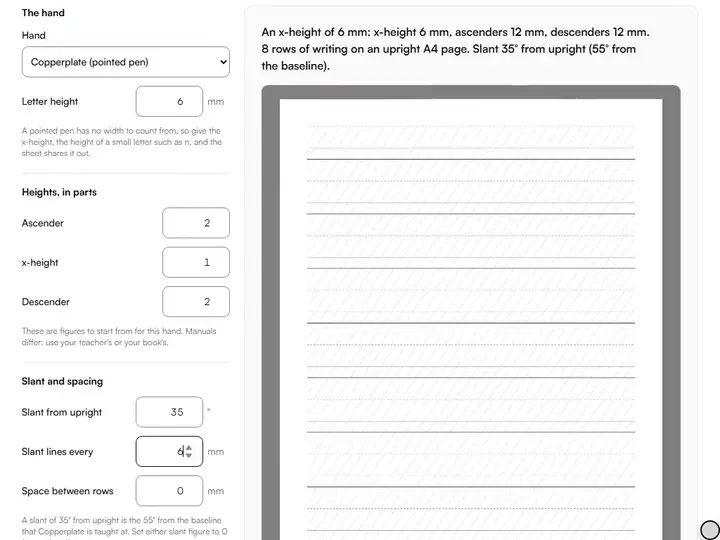
Slant lines keep every downstroke leaning the same way. The page measures slant from upright: 0 is straight up, 5 is a gentle Italic lean. Copperplate is usually taught at 55 degrees from the baseline, which is 35 from upright, and the page says both.
A pointed pen has no fixed width, so Copperplate guidelines are set by the x-height and a ratio. At 2 : 1 : 2 with a 6 mm x-height, ascenders and descenders are 12 mm each, so a loop stands three times as tall as a small letter.
Where the starting figures come from
Two were checked in a manual. Edward Johnston's Writing & Illuminating, & Lettering (1906) gives the o of his round hand as about four times the width of the thick stroke: Foundational opens at four. The Zanerian Manual of Alphabets and Engrossing (1924) has roundhand loops nearly three times the small letters' height: Copperplate opens at 2 : 1 : 2.
The rest are figures other guides publish: five nib widths for Italic and Gothic, four for Uncial, seven for Roman capitals, and Copperplate's 55 degrees. Books and teachers differ, sometimes by half a nib width, and none of them is a law.
It leaves out Spencerian, brush lettering and other hands for now, because no starting figures for them were checked. Any of them can be ruled by entering your own numbers. For line and ellipse warm-ups, see the line and ellipse drill sheets.
Further reading
The page below goes further into the ideas the Calligraphy Guideline Generator works with, and opens on the site named beside it.
- Drawing lessons on Artistic Masterclass (ArtisticMasterclass.com)
Tips from a working artist
From Sujith Puthran, artist and founder: what I actually do at the easel.
I rule a sheet for each nib I own and write the nib's name on it in pencil. It saves measuring again.
I put the guide sheet under thin layout paper and write on top. The lines show through and the good paper stays clean.
Questions about the Calligraphy Guideline Generator
The 6 questions below cover Italic height, nib width and Copperplate slant, then print size, brush lettering and cost.
Sizes
How many nib widths high is Italic?
Italic is five nib widths high for the x-height, the usual figure, with ascenders and descenders about three more each. Some manuals give four or five for those; follow the one you are learning from.
How do I measure my nib's width?
To measure your nib's width, measure straight across the writing edge with a ruler, or draw one stroke at a right angle to the edge and measure the stroke. Some makers' size numbers are not millimetres, so measure.
What slant is Copperplate written at?
Copperplate is written at a slant of 55 degrees measured up from the baseline, as it is taught. That is 35 degrees from upright, which is how this page asks for it. A teacher may set another slant, and the page takes any.
Printing
Why are my printed lines the wrong size?
Your printed lines are the wrong size because the printer has scaled the page. Print at 100% or actual size, not fit to page, and measure the 50 mm line at the foot of the sheet.
Can I use it for brush lettering?
Yes, you can use it for brush lettering by choosing Copperplate and entering your own x-height, ratio and slant. The page has no brush preset because no starting figures for one were checked.
Is the Calligraphy Guideline Generator free?
Yes, the Calligraphy Guideline Generator is free. The sheet is free to make and print, with no account and no watermark.
Enter the nib, print the sheet, and write.
Free · No sign-up · Runs in your browser