Free Memory Drawing Trainer
Learn to draw from memory the atelier way: study a picture for a set time, let it hide, draw it on your own paper, then bring it back and compare. The study time shortens as your results improve, and a photo of your drawing can be measured against the picture. Exports CSV. Free, with no sign-up, and your picture never leaves your device.
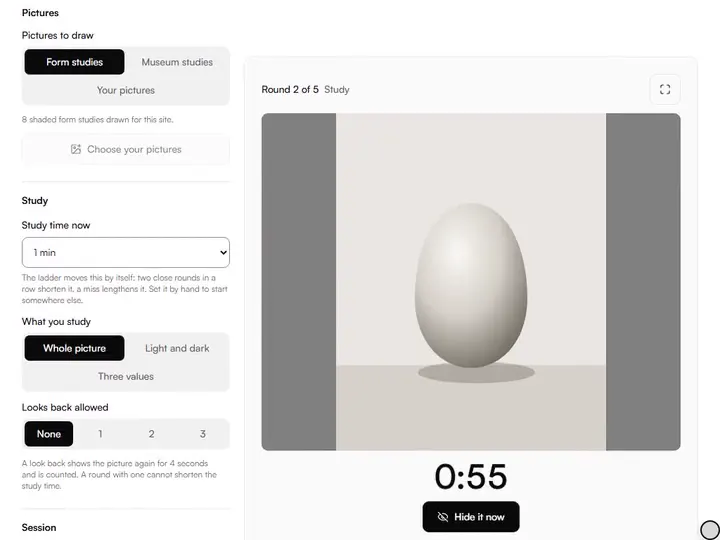
Each round: study the picture, it hides, you draw it from memory on your own paper, and it comes back for you to compare. Photograph the drawing and it is measured against the picture. Nothing is uploaded.
%22%2F%3E%3C%2Fsvg%3E)

%22%2F%3E%0A%20%20%20%3Cellipse%20cx%3D%22300%22%20cy%3D%22290%22%20rx%3D%22120%22%20ry%3D%2234%22%20fill%3D%22%23dedad2%22%2F%3E%0A%20%20%20%3Cellipse%20cx%3D%22300%22%20cy%3D%22290%22%20rx%3D%22120%22%20ry%3D%2234%22%20fill%3D%22none%22%20stroke%3D%22%23b7b2a8%22%20stroke-width%3D%223%22%2F%3E%3C%2Fsvg%3E)
%22%2F%3E%3C%2Fsvg%3E)
%22%2F%3E%3C%2Fsvg%3E)
%22%2F%3E%0A%20%20%20%3Ccircle%20cx%3D%22292%22%20cy%3D%22268%22%20r%3D%2292%22%20fill%3D%22url(%23stTop)%22%2F%3E%3C%2Fsvg%3E)

%22%2F%3E%0A%20%20%20%3Cellipse%20cx%3D%22444%22%20cy%3D%22446%22%20rx%3D%2242%22%20ry%3D%2258%22%20transform%3D%22rotate(-15%20444%20446)%22%20fill%3D%22%23d9d4cb%22%2F%3E%3C%2Fsvg%3E)
A page to draw on from memory, with a pen, a mouse or a finger.
A ladder of study times.From two minutes down to five seconds. Two close rounds in a row shorten the study; a miss lengthens it.
Measured, not guessed.Photograph the drawing and its drift from the picture is measured on your device.
Your own pictures.Use the form studies, the museum studies, or any pictures of yours. Yours are never uploaded.
Looks back, counted.Allow yourself up to three four-second looks back. Each is counted against the round.
- Free
- No sign-up
- Runs in your browser: your image never leaves your device
What does it mean to draw from memory?
To draw from memory is to look at a subject, take it away, and draw it without looking again. As an exercise it trains the eye to take in the large shapes and their proportions in one look, because nothing can be checked while the pencil is moving. The drawing is compared with the subject afterwards.
How to use the Memory Drawing Trainer
The tool takes 6 steps, all on your device.
Choose Form studies or Museum studies, or Choose your pictures to use your own.
Set Study time now, What you study, how many Looks back are allowed, and the number of Rounds.
Choose Start session and study the picture until the clock runs out, or choose Hide it now.
Draw it from memory on your own paper, then choose I have finished: show it.
Compare. Choose Photo of my drawing to have it measured, or mark Close, Partly or Missed yourself.
Choose Next round. At the end, read where the study time now stands.
What the Memory Drawing Trainer does
The Memory Drawing Trainer runs four steps, study, hide, draw and reveal, then shows the two side by side and where the drawing drifted.
Study, hide, draw, reveal
Among the drawing practice tools, this one takes the picture away. The clock keeps the right time even if you switch to another tab.
Three ways to study
The whole picture, its light and dark shapes in two values, or its masses in three.
Side by side, and flick
See the picture and your drawing together, or flick between them in one frame so a difference shows as a jump.
Where it drifted
The measurement names the places that strayed most: lower at the top right, further left in the middle.
For the easel
A sound cue when the picture hides, a full-screen view, and a screen that stays awake while you draw.
History on your device
Each session's study time is charted, the ladder remembers where you stopped, and the history exports as a spreadsheet file.
How it compares with other memory drawing tools
Each was used in a browser on 2 October 2026. Only what was seen is stated.
| Feature | This tool | Practice Drawing This | DoodleLab Memory Draw |
|---|---|---|---|
| Timed study | 2 minutes to 5 seconds | Untimed: you draw it from observation first | 3, 5 or 8 seconds |
| Study time changes with your results | Yes | No | No |
| Pictures | Form studies, museum studies, or your own | Its own picture cards | Its own doodles |
| Where you draw | On your own paper | On paper, or on screen | On screen |
| How the result is judged | Measured drift from a photo, or your own call | The picture comes back for you to correct | A robot names the subject of your drawing |
| Looks back | Up to three, counted | A step to redraw after checking | Not seen |
| Other servers the page contacted | None | None | 2 |
Practice Drawing This also lists a Check accuracy of your drawing option, which opened a file chooser; what it shows after was not established. Tate Draw, a drawing app for schools with a memory challenge, was opened and not tried.
For anyone training visual memory
Atelier students, urban and life sketchers and teachers train visual memory with it.
Atelier students
Run the memory exercise between cast sessions without a partner to hold the picture.
Urban and life sketchers
Practise catching a subject that will not hold still for a second look.
Teachers
Put a picture on the projector for a set time, hide it, and bring it back for the class to compare.
A memory drawing exercise with a clock
The exercise is old and simple: look, hide, draw, compare. What makes it hard to do alone is the hiding. If the picture is a browser tab away it is too easy to glance back, and without a clock nobody knows whether they studied for ten seconds or two minutes. Here the picture is shown for a set time, hides itself, and stays hidden until you say you have finished.
You draw on your own paper, with your own materials. The screen only keeps time and holds the picture.
How the ladder works
The study times are 2 minutes, 90, 60, 45, 30, 20, 15, 10 and 5 seconds. You start at one minute unless you choose otherwise. Two rounds in a row that come out close move you down one step, to a shorter study. A round that misses moves you up one step. A round that is only partly right holds the step and starts the count of close rounds again.
A round in which you looked back can keep its step, but it cannot earn a shorter one: the ladder moves on memory alone. The ladder is kept on your device, so the next session starts where this one stopped. These rules are this tool's own.
Measuring the drawing
After the reveal you can judge the drawing by eye, or photograph it. The photo is lined up with the picture on your device and compared part by part, with the same measure as the drawing accuracy checker: how far each part of the drawing sits from where the picture has it, as a share of the picture's longer side. A median drift of 3 % or less counts as close, more than 6 % as missed.
If the photo cannot be lined up, or too little of it can be measured, the page says so and leaves the judgement to you. You can always overrule the measurement.
Light and dark, and three values
A full picture is a lot to carry in the head. Light and dark reduces it to two values, cut where the picture's lights and darks divide most clearly, so you memorise the shadow shape. Three values divides the picture's own range into darks, middles and lights. Both are made from the picture on your device; to design with them, use the notan generator.
What it leaves out
You do not draw on the screen: this is an exercise for paper. Without a photo, the result is your own honest call. The measurement needs a drawing made at the picture's proportions and a photo taken fairly square on. The two-value view is the picture's light and dark shapes, not the subject cut out from its background. The built-in sets are eight form studies and the museum sculptures and clothed studies from the figure drawing reference library. There are no levels, points or leaderboards.
Further reading
The page below goes further into the ideas the Memory Drawing Trainer works with, and opens on the site named beside it.
- Drawing and painting lessons on Artistic Masterclass (ArtisticMasterclass.com)
Tips from a working artist
From Sujith Puthran, artist and founder: what I actually do at the easel.
I spend the study time on the big shape and its tilt, and let the details go. The details are what I can invent; the proportions are what I cannot.
I say the picture to myself while I look: twice as tall as wide, leaning left, darkest at the bottom. Words stay when the image fades.
Why your picture stays on your device
The Memory Drawing is a program your browser downloads and runs by itself. When you choose a picture, the browser reads it from your files and does the work on your own phone or computer; no copy is sent to this site or to anyone else, and what you export is saved straight from the browser. That is why there is nothing to upload and nothing to sign up for. The privacy page says what the site does collect.
Questions about the Memory Drawing Trainer
The 6 questions below cover the exercise, study time, faces and where to draw, then your data and the practice log.
The exercise
How do I draw from memory?
To draw from memory, look for the largest shape, its proportions and its main angles, and fix those in mind before anything else. Then put the subject away and draw those first. Short, repeated rounds train it faster than one long one.
How long should I study the picture?
Study the picture for one minute to start. If two rounds in a row come out close, the tool shortens the time for you; if a round misses, it lengthens it.
Can I use it for drawing faces from memory?
Yes, you can use it for drawing faces from memory: choose your own pictures and load portraits or photographs of faces. The measurement compares the placement of the features and the outline with your drawing.
Do I draw on the screen?
No, you do not draw on the screen. You draw on paper. The screen shows the picture, hides it, keeps time and, if you photograph the drawing, measures it.
Your data
Are my pictures or my drawing uploaded?
No, your pictures and your drawing are not uploaded. They are read and compared on your device, and the page contacts no other server.
Can sessions go to my practice log?
Yes, once you turn on Add sessions to my practice log. It is off until you turn it on.
Study, hide, draw, reveal: five rounds, with a study time that follows your results.
Free · No sign-up · Runs in your browser