Free Value Key Analyzer
Every painting has a value key: the pitch its whole tonal structure is set in. Load a reference or a photo of your painting, or point your camera at the easel, and read it: high, middle or low key, major or minor span, the largest value mass, and the key of every region. Add an opt-in depth model to read near, middle and far planes separately, then compare your painting with the reference zone by zone. Exports PNG. Free, with no sign-up, and your picture never leaves your device.
Drop an image here, or paste from clipboard
Your image stays on your device. Nothing is uploaded.
JPG, PNG, WebP, GIF, AVIF or BMP
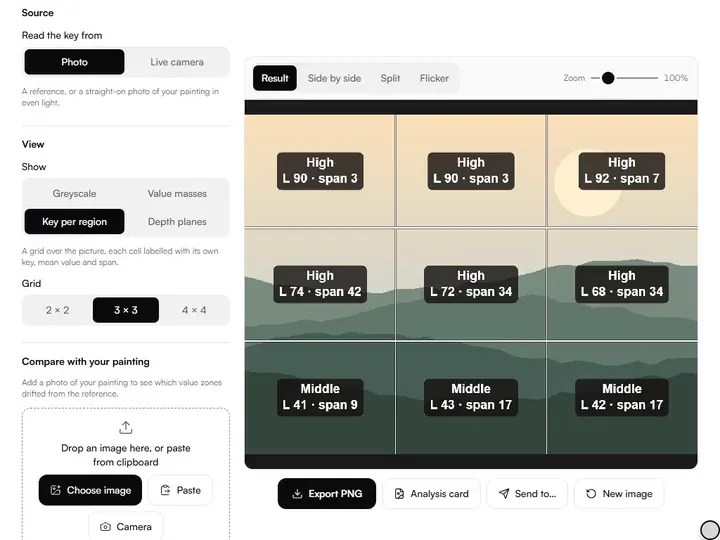
Key per region.A 2 × 2 to 4 × 4 grid with each cell's key, mean value and span, on the picture and in a table.
Value per depth plane.An opt-in on-device depth model splits the picture into near, middle and far, and reads each plane's key.
Live camera.Point the camera at your painting to read its key and histogram live, then freeze a frame to study.
Compare with your painting.Load a second photo to see if it reads lighter or darker, how its span changed, and which zones drifted.
- Free
- No sign-up
- Runs in your browser: your image never leaves your device
What is a value key analyzer?
A value key analyzer measures where a picture's values sit on the light–dark scale and how far they reach. This one names a painting or reference high-, middle- or low-key, calls its span major or minor, reads the key of each region and depth plane, and compares your painting's value zones with the reference.
How to use the Value Key Analyzer
The tool takes 6 steps, all on your device.
Drop in a reference or a photo of your painting, or set Source to Live camera and point it at the easel; Freeze this frame keeps a frame to study.
Read the four tiles under the picture: the key from the mean lightness, the span from the 2–98% range, and the largest of ten value zones. The histogram marks the key limits at L 38 and L 62.
Under View, pick Greyscale to see the darkest dark and lightest light marked, Value masses for the picture in three flat values, or Key per region with a 2 × 2, 3 × 3 or 4 × 4 grid.
For Depth planes, choose near and far or three planes and press Estimate depth. The first time, this downloads the 19 MB model; after that it runs straight away.
Under Compare with your painting, add a photo of your work to see whether it reads lighter or darker and which zones drifted.
Export PNG or an Analysis card. View, grid and plane settings stay in the address, so a copied link reopens the same reading.
What the Value Key Analyzer does
The Value Key Analyzer names a picture's key as high, middle or low, measures a span that ignores specks, and finds three value masses.
High, middle or low key
The analyzer names a picture's key from its mean lightness: at or below L 38 is low-key, at or above L 62 is high-key, and anything between is middle-key. Of the value and tone tools for artists on this site, this one reads a finished value structure instead of simplifying it.
A span that ignores specks
The value span runs from the 2nd to the 98th percentile of lightness, so a stray highlight cannot stretch it. A span of 55 L or more counts as major.
Three value masses
Value masses redraws the picture in three flat values, cut at the same L 38 and L 62 limits that set the key, and gives each mass's share of the picture.
Depth from one photo
Depth Anything V2 Small (Apache-2.0) estimates relative depth from the picture alone. The planes are cut at the natural breaks in that depth, not at fixed distances.
Exports to keep
Export PNG saves the current view at full resolution; Analysis card saves the numbers and histogram as one image.
Stays on your device
All measuring happens in the browser; no picture leaves your device.
Painters checking the key they meant
Working painters, art students, illustrators and art teachers check with it that a picture holds the key they meant.
Working painters
Working painters can load the reference, then a photo of the canvas under Compare with your painting.
Art students
Art students can call a picture's key aloud, then load it and check the guess against the key label.
Illustrators
Illustrators can load candidate references in turn and keep the one whose largest value mass suits the mood.
Art teachers
Art teachers can export cards for a high-key and a low-key painting so a class compares the histograms.
What is a value key?
Musicians transpose a song into a key that suits the singer; painters key a picture into the part of the value scale that suits the subject. A high-key picture lives in the lights, with darks used sparingly as accents. A low-key picture lives in the shadows, and its lights arrive as events. Middle key sits between.
Key says where the picture lives; span says how far it reaches. A major span runs from near-black to near-white, like direct sun. A minor span keeps to a narrow band, all mist or all shadow.
The largest mass is your home key
The zone carrying the most pixels is the picture's home value. In a strong design one mass dominates: the big, medium and small shapes of composition apply to values too. Value masses shows the picture in three flat values and says which one is largest; when none reaches half the picture, the design may be split into competing thirds.
The markers in the greyscale view show where the extreme accents sit. An extreme hiding in a corner pulls the eye there whether you meant it or not.
Key per region
A whole-picture key can hide a split design: a high-key sky over a low-key field averages out to middle key. The grid view reads every cell on its own and names the lightest and darkest cells and how far apart they sit. A 3 × 3 grid lines up with the rule of thirds; a 4 × 4 grid finds smaller pockets of value.
Value per depth plane
Landscape painters push distance back with aerial perspective: far values move toward the sky's value and lose contrast. With Depth planes, an on-device model estimates which parts of the picture are near and far, the planes are cut where the depth naturally breaks, and each plane gets its own key and span. The tool then says whether the far plane is lighter and its span narrower than the near one.
It downloads once from this site, the browser keeps it, and it runs on your device; on our test machine a 1,200-pixel image took about 7 seconds. Depth from a single photo is an estimate of order, not distance, and flat artwork has no real depth to find, so use this view on references and scenes.
Comparing your painting to the reference
Load the reference, then a straight-on photo of your painting: the tool says whether yours reads lighter or darker, whether the span changed, and which zones gained or lost mass.
A common pattern is shadows painted lighter than the reference, or a narrowed span where both extremes surrendered to the middle. For a spot-by-spot check, the value checker lines the two pictures up first. When planning, work the other way: re-key the reference with the value range compressor, then confirm the plan here.
Further reading
The page below goes further into the ideas the Value Key Analyzer works with, and opens on the site named beside it.
- Value keys and tonal design in the painting curriculum (ArtisticMasterclass.com)
Tips from a working artist
From Sujith Puthran, artist and founder: what I actually do at the easel.
Guess the key and span before you measure: the gap between guess and reading is your personal value bias, and it is worth knowing.
Point the live camera at the easel from across the room; the key tile is a quick check between passes without taking a photo.
A painting that feels flat almost always shows a narrowed span in the drift comparison: restate the extremes before adding detail.
Key is how light or dark the masses are; where they sit in space is another question. The Depth & Planes Viewer splits a picture into three bands of distance.
Why your picture stays on your device
The Key Analyzer is a program your browser downloads and runs by itself. When you choose a picture, the browser reads it from your files and does the work on your own phone or computer; no copy is sent to this site or to anyone else, and what you export is saved straight from the browser. That is why there is nothing to upload and nothing to sign up for. The privacy page says what the site does collect.
Questions about the Value Key Analyzer
The 5 questions below cover the L numbers and the 2–98% span, then drift, the depth model and comparisons.
The readings
What do the L numbers mean?
The L numbers mean perceptual lightness on a 0–100 scale (OKLab L): 0 is ideal black, 100 ideal white, and equal steps look roughly equally spaced to the eye. The value checker shows the same lightness beside its reading on the artist's 1–10 value scale.
Why does the tool use the 2–98% span instead of the true extremes?
The tool uses the 2–98% span instead of the true extremes because a single black pixel or specular highlight would otherwise stretch the reading dishonestly. The 2nd and 98th percentiles describe the span you actually work in; the separate darkest-dark and lightest-light readouts still show you where the true extremes live.
Comparing
How big a drift matters?
A drift matters when it is big enough to list: zones are listed when their share moves 4 percentage points or more. The painting reads lighter or darker when its mean moves 3 L, and its span wider or narrower when it changes 6 L.
Does the depth model upload my picture?
No, the depth model does not upload your picture. The model file comes to your browser from this site the first time you press Estimate depth, about 19 MB, and the browser keeps it for later. The estimate runs on your device, and nothing is fetched at all until you press the button.
Which image sets the key label when I compare two?
The first image you load sets the key label and every figure in the tiles. The second is reported as differences from it, so load your painting first when you want its own key label.
Load a reference, a photo of your painting or the live camera to see its key, span, masses and planes.
Free · No sign-up · Runs in your browser