Free Drawing Prompt Generator
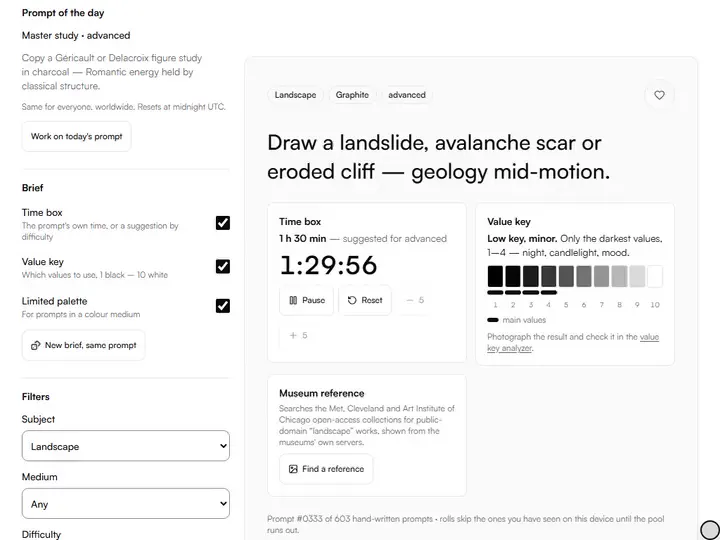
Over 600 hand-written drawing prompts, each with a brief (a time box, a value key, a limited palette and a public-domain museum reference) plus lockable parts, group play and printable cards. Exports PDF. Free, with no sign-up, and it runs in your browser.
Draw your own face from a mirror, focusing only on the big light and shadow shapes.
Low key, major. Mostly values 1–4, with a few small lights (8–10) that sing.
Photograph the result and check it in the value key analyzer.
Searches the Met, Cleveland and Art Institute of Chicago open-access collections for public-domain “portrait” works, shown from the museums' own servers.
Prompt #0001 of 603 hand-written prompts · rolls skip the ones you have seen on this device until the pool runs out.
Roll a prompt.Draw a new prompt from everything your filters and locks allow, skipping the ones this device has shown until the pool runs out.
A brief around the prompt.A time box read from the prompt or suggested by difficulty, one of six value keys, and a limited palette for color media.
Lock parts.Keep the current prompt's subject, medium, difficulty or constraint fixed, then roll again to change only the rest.
Prompt of the day.One prompt for every visitor worldwide, chosen from the UTC date and replaced at midnight UTC.
- Free
- No sign-up
- Runs entirely in your browser
What is a drawing prompt generator?
A drawing prompt generator is a tool that hands you a specific assignment, so practice time goes to drawing rather than to deciding what to draw. This one rolls from 603 prompts written for this project, each tagged with a subject, suggested media and a difficulty level, and 88 of them with a constraint.
How to use the Drawing Prompt Generator
The tool takes 6 steps, all on your device.
Press “Roll a prompt”: you get one concrete assignment and a brief around it.
Read the brief: a time box with a timer, a value key, a limited palette for color media, and a museum reference if you ask for one.
Lock any part you want to keep (subject, medium, difficulty or constraint) and roll again to vary the rest.
Narrow the field with the filters; rolls skip prompts this device has already shown.
Drawing with a group? Deal a different prompt to each player and pass the device around.
Print the prompts as cards, copy the brief, or share a link that reopens the same prompt and brief.
What the Drawing Prompt Generator does
The Drawing Prompt Generator gives assignments with the lesson inside, from a database written for this project, at three levels of difficulty.
Assignments with the lesson inside
The Drawing Prompt Generator hands out concrete assignments with the skill written into them: which proportion to check, how many values to use, what to draw first. Among the drawing practice tools, it is the one that settles what to draw today.
A database written for this project
The database holds 603 prompts written for this project, 67 in each of nine subjects from portrait to master study. None is assembled from random word lists.
Three balanced difficulty levels
Every prompt carries one of three levels: 197 beginner, 208 intermediate and 198 advanced. A Difficulty filter or lock keeps a whole session at one level.
Group play and printed cards
Group play deals up to 30 players a different prompt each, revealed in turn on one device. Print cards makes a PDF of 8, 16 or 24 prompts with briefs and cut lines.
Constraints that set the problem
Ten constraint types, from Time limit to Upside down, are attached to 88 prompts, one each. A constraint narrows the exercise to a single problem, such as drawing from memory or in negative space.
Links that reopen the brief
Every roll writes the prompt's id and its brief into the page address, so a bookmarked or shared link reopens the same assignment, value key and palette.
For artists who want a clear assignment
Beginners, hobbyists, art students and art teachers take a prompt from it when a clear assignment is wanted.
Beginners
Beginners can set Difficulty to Beginner and roll from 197 prompts that work one skill at a time, such as placing the eyes.
Hobbyists
Hobbyists can make the Prompt of the day a habit, since it stays the same for everyone until midnight UTC.
Art students
Art students can filter to Master study for 67 prompts that copy named works by Rembrandt, Hokusai, Vermeer and others.
Art teachers
Art teachers can give a whole class the same assignment through a single Share link, with no accounts involved.
Why these prompts are written, not generated
A generator that joins a random adjective to a random noun and a style word produces novelty, not practice: "a steampunk avocado in the rain" is funny once and teaches nothing. Here, a beginner portrait prompt names the proportion to check; an advanced landscape prompt names the design problem to solve. When a prompt says "one line" or "ten minutes", that limit is the lesson.
Beginner prompts isolate one skill at a time. Intermediate prompts combine skills and add real-world complications, such as reflections in chrome or a lit shop window at night. Advanced prompts ask for invention: drawing from memory, designing multi-figure compositions, working in a master's manner rather than copying their surface.
How to use locks and filters together
The locks answer a familiar frustration with prompt generators: you roll something almost right and lose it on the next click. Lock the subject and keep rolling until the medium suits what's on your desk, or lock a Time limit constraint when you only have a lunch break.
The filters work from the other direction and narrow the whole database before you roll. Watercolor plus Landscape leaves 7 prompts, and the count under the filters always shows exactly how many remain.
The prompt of the day ritual
The daily prompt is chosen deterministically from the UTC date: no server, no randomness, no timezone lottery. Everyone who opens the tool on the same UTC day gets the same assignment, which makes it usable as a shared ritual: a classroom warm-up, a drawing group's daily thread, a quiet contest with a friend abroad.
For a longer commitment, the art challenge generator builds a 7-, 14-, 30-, 31- or 100-day art challenge from this same prompt database and prints it as a calendar.
Master studies, constraints and other ways to suffer productively
The master-study prompts point at named works (Rembrandt's eyes, Hokusai's wave, Sargent's brushwork) because copying great work with a question in mind is a long-established method of art education. The question is always embedded in the prompt: don't just copy Vermeer, copy his light logic.
Constraints deserve special respect. Limited palette builds every mix from a few pigments. Non-dominant hand breaks muscle memory and restores sensitivity. Single value range caps a drawing at a small, fixed set of values. The prompt that annoys you is often the one aimed at your weakest skill.
For a master study, Find a reference searches the Met, Cleveland and Art Institute of Chicago open-access collections for public-domain works by the named artist; most other subjects search by subject. For timed gesture sets, the gesture drawing timer holds the clock.
Further reading
The page below goes further into the ideas the Drawing Prompt Generator works with, and opens on the site named beside it.
- Drawing fundamentals and practice methods on Artistic Masterclass (ArtisticMasterclass.com)
Tips from a working artist
From Sujith Puthran, artist and founder: what I actually do at the easel.
Start the time box before the first mark: urgency is the antidote to fiddling.
When a prompt feels too hard, do it small: a 10 cm study of an advanced prompt beats avoiding it.
Roll three prompts at the start of a session and pick the one that scares you slightly.
Keep a dedicated sketchbook for daily prompts; the accumulated pages become the real reward.
Redraw a prompt from a month ago and keep both versions: progress you can hold.
Teaching? Filter to one subject, deal a prompt per student, and print the dealt set as cards.
For prompts away from a screen, the Sketchbook Prompt Jar prints prompts as cut-out slips, with a label for the jar.
Questions about the Drawing Prompt Generator
The 8 questions below explain how the prompts are written, how locks and links work, and where favorites and history are kept.
The prompts
Why is there no 'random style' option?
There is no random style option because style roulette teaches mimicry, not drawing. These prompts train observation, construction and design: the skills that make any style possible.
What happens when no prompt matches my filters?
When no prompt matches your filters, the roll stops, the current prompt stays on screen, and a message asks you to loosen a filter.
Are the prompts really hand-written?
Yes, the prompts are really hand-written: all 603 of them, written for this project. No scraped lists, no random word combinations, no filler. Each one targets a specific skill, which is why they read like assignments rather than slot-machine output.
Locks and links
What does a locked Medium keep?
A locked Medium keeps the first medium listed on the current prompt, even when the prompt suggests two or three. Constraint can be locked only when the current prompt carries one, as 88 of the 603 do.
How does the prompt of the day work?
The prompt of the day works by hashing the UTC date into an index into the database: the same calculation for every visitor, everywhere. It resets at midnight UTC, needs no server, and can't be gamed by refreshing.
How is the value key chosen?
At random from six keys (high, middle or low, each major or minor) using the thresholds of the value key analyzer, so a photo of the finished drawing can be checked against it.
Use and storage
Where are my favorites and history stored?
Your favorites and history are stored in your browser's local storage on this device: up to 100 favorites and the last 300 prompts shown. Nothing is uploaded; Clear history resets which prompts count as seen.
Can I use these prompts for work I sell or post?
Yes, you can use these prompts for work you sell or post. The prompts are ideas, and ideas are free. Anything you draw from them is entirely yours, commercially or otherwise. Credit is welcome but never required.
Roll a prompt, lock the part you like and finish one drawing before you roll again.
Free · No sign-up · Runs in your browser