Free Art Challenge Generator
Build a 7- to 100-day drawing challenge from 603 hand-written prompts, a 14-day skill track or your own pasted list, with a calendar PDF, an .ics file for your calendar app and a photo of each day's work. Free, with no sign-up, and it runs in your browser.
Design your 30-day challenge
Any medium · difficulty ramps up in thirds · starts Fri 16 Oct. Every day gets a concrete prompt from the hand-written database of 603 prompts: no repeats while the pool lasts.
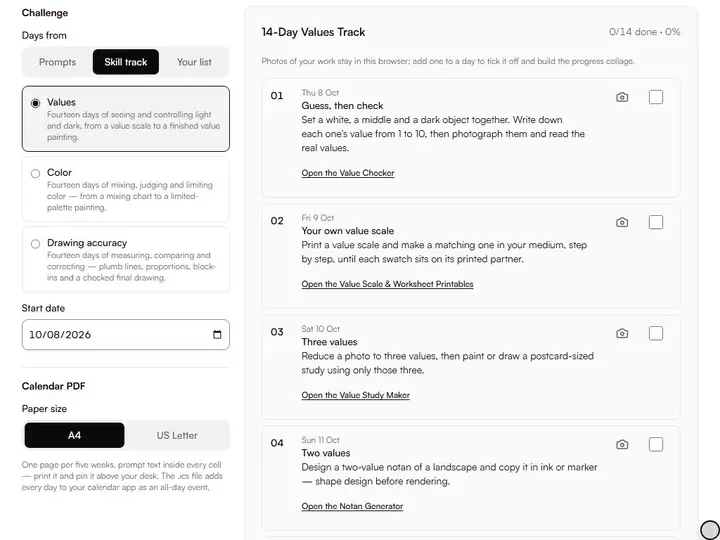
Three sources.Prompts from the database in 7 to 100 days, a 14-day skill track, or a pasted list with its numbering removed.
Add to calendar (.ics).Saves every day as an all-day event holding its prompt, ready to import into Google Calendar, Apple Calendar or Outlook.
Re-roll a day.The dice beside each day draws that day's prompt again, skipping every prompt already used elsewhere in the challenge.
Download calendar PDF.Prints the challenge on A4 or US Letter, five weeks to a page, with each day's prompt inside its cell.
- Free
- No sign-up
- Runs entirely in your browser
What is a 30-day drawing challenge?
A 30-day drawing challenge is a set of thirty drawing prompts, one for each day, decided in advance so every session starts without choosing a subject. The Art Challenge Generator builds one from a hand-written database of 603 prompts, in 7-, 14-, 30-, 31- or 100-day lengths, and exports it as a calendar PDF.
How to use the Art Challenge Generator
The tool takes 6 steps, all on your device.
Choose where the days come from: prompts, a 14-day skill track (values, color or drawing accuracy), or your own list.
Pick a theme and medium, or leave both open for variety across all nine subjects.
Keep the difficulty ramp on to start with beginner prompts and finish on advanced ones.
Set your start date and press “Generate challenge”: every day gets a concrete prompt, with no repeats while the matching prompts last.
Re-roll a prompt day that doesn't fit your life; add a photo of each day's work to tick it off. Progress saves on your device.
Download the calendar PDF (A4 or US Letter), add the days to your calendar app with the .ics file, or save the share image.
What the Art Challenge Generator does
The Art Challenge Generator sets a prompt for every day, raises the difficulty in thirds, and keeps progress and photos on this device.
A prompt for every day
The Art Challenge Generator assigns a concrete prompt to every day before day one, from 603 hand-written prompts tagged by subject, medium and difficulty. Among our drawing practice tools, it is the one that plans weeks of practice instead of a single session.
Difficulty in thirds
The difficulty ramp splits the days into thirds by day number, so a 30-day challenge draws beginner prompts on days 1–10, intermediate on 11–20 and advanced on 21–30. When a third runs out of unused prompts, the difficulty filter drops before any prompt repeats.
Repeats only when the pool runs out
The generator reuses a prompt only after every prompt matching the theme and medium has appeared. One theme holds 67 prompts, so a themed 100-day challenge repeats from day 68.
Progress kept on this device
The prompt list and every ticked day are saved in your browser's local storage, and nothing is uploaded or synced. The saved challenge reopens when the page has the same settings and start date.
Photos and a progress collage
A photo of a day's work is resized, kept in this browser (never uploaded) and ticks the day. Progress collage lays every photographed day into one numbered 1080×1350 image.
Settings kept in the link
The page address stores the length, theme, medium, ramp, the start date you pick and the paper size, so a bookmark reopens the same setup. Each press of Generate challenge draws new prompts, even with identical settings.
Artists building a daily drawing habit
Beginners, hobbyists, working painters and art teachers use a challenge to build a daily drawing habit.
Beginners
Beginners can keep the difficulty ramp on, so the first ten days of a 30-day challenge stay on beginner prompts.
Hobbyists
Hobbyists can try the 7-day length with one theme, such as Animal, as a first week of the habit.
Working painters
Working painters can set the Medium to Oil and switch the ramp off for mixed-difficulty studies from day one.
Art teachers
Art teachers can hand out one calendar PDF, so the whole class works from the same prompt on the same date.
Why challenges work when willpower doesn't
A drawing challenge is a pre-made decision. The hard part of daily practice is rarely the drawing; it is the daily negotiation about whether, what and how long. A challenge settles all three in advance: today is day 12, here is the prompt, draw it.
Each length has a job. Seven days tests whether the habit fits your week; fourteen builds a first streak. Thirty and thirty-one cover a calendar month, long enough to compare the last drawing with the first. A hundred days is a season: decide before you start how you will handle the hard weeks.
The difficulty ramp, and why it matters
A flat challenge asks as much of day one as of day thirty. Week one needs wins: small, finishable prompts that carry you to day two. By the last third your hand is warm, and that is when prompts should ask for invention, memory work and longer studies.
If you already draw every week, turn the ramp off, and advanced prompts can land on day one. Sick day, travel day, a prompt that needs a model you don't have: re-roll that day and keep the streak honest but humane.
The calendar is the trick
The printable calendar puts the plan where you work. Because each cell holds that day's prompt, the wall calendar doubles as the brief, and crossing off a cell makes the streak visible without a device. Pin it where you make art.
The share image announces the challenge with every day on one picture: a 4:5 post for up to a month, a 9:16 story for a hundred days. The progress collage shows the finished days side by side. Post the start, the middle and the end.
Designing your own rules
The prompts supply the what; you supply the rules that make the challenge yours. Useful ones: a fixed daily time cap (fifteen minutes beats "as long as it takes"), a single sketchbook so the whole challenge lives between two covers, and a declared mercy rule, such as two re-rolls per week.
A timed warm-up fits inside the same cap: the gesture drawing timer runs short poses from your own reference images before the day's prompt.
Themed challenges build depth in one subject; open ones build range. And don't make up missed days with double sessions: a challenge that turns into debt collection dies within the week. The calendar is a guide rail, not a judge.
Further reading
The page below goes further into the ideas the Art Challenge Generator works with, and opens on the site named beside it.
- Building a sustainable daily practice on Artistic Masterclass (ArtisticMasterclass.com)
Tips from a working artist
From Sujith Puthran, artist and founder: what I actually do at the easel.
Attach the challenge to an existing habit (after coffee, before lunch) rather than a vague "sometime today".
Keep the time cap sacred; a drawn-every-day month of sketches beats a week of masterpieces and burnout.
Print the calendar before day one. Commitment made physical is harder to quietly abandon.
Re-roll strategically, not reactively: decide your weekly re-roll budget before you start.
End every session by reading tomorrow's prompt: your subconscious works on it overnight.
On day 100 (or 30), redraw day one's prompt and keep both. That's your evidence.
Questions about the Art Challenge Generator
The 8 questions below cover the plan and a missed day, then the calendar PDF, a changed prompt, saved progress and shared challenges.
The plan
Where do the challenge prompts come from?
The challenge prompts come from the same hand-written database as the drawing prompt generator: 603 prompts written by an artist, tagged by subject, medium, difficulty and constraint. Without a theme or medium set, a 100-day challenge never repeats a prompt.
What is in the skill tracks?
Three 14-day tracks written for this site: Values, Color and Drawing accuracy. Each day is one exercise, such as a two-value notan or a plumb-line check, linked to the tool that sets it up or checks it.
What if I miss a day?
If you miss a day, nothing breaks. Unticked days simply stay unticked: the challenge waits. Keeping going from where you are is kinder than doubling up to "catch up".
Using it
What paper sizes does the calendar PDF support?
The calendar PDF supports two paper sizes, A4 and US Letter, at one page per five weeks, with weeks starting on Monday. A 30-day challenge prints on one or two pages depending on its starting weekday; a 100-day challenge on three or four.
What does Start over do?
Start over draws new prompts for the current settings and clears every ticked day. Only one challenge is stored at a time, so a new one replaces the saved one.
Can I change a prompt I don't like?
Yes, you can change a prompt you don't like: every day has a re-roll button that draws again from prompts matching that day's theme, medium and difficulty, while skipping everything else already in your challenge. Use it freely; the streak matters more than any single prompt.
Is my progress saved?
Yes, your progress is saved automatically: your generated challenge and every ticked day are stored in your browser's local storage on this device, and nothing is uploaded or synced. It reappears when the page opens with the same length, theme, medium, ramp and start date.
Can I run the same challenge as a friend or a class?
Yes, you can run the same challenge as a friend or a class. A skill track or a pasted list gives everyone the same days. Prompt challenges draw new prompts each time, so share the calendar PDF or the .ics file instead.
Choose a length and a theme, then print the calendar before day one.
Free · No sign-up · Runs in your browser