Free Notan Generator
Turn any photo into a 2- or 3-value notan design: the quickest test of whether a composition will hold together. Exports PNG, SVG and PDF. Free, with no sign-up, and your picture never leaves your device.
Drop an image here, or paste from clipboard
Your image stays on your device. Nothing is uploaded.
JPG, PNG, WebP, GIF, AVIF or BMP
Number of values.Switch between a strict two-value black-and-white design and a three-value plan that adds a middle grey.
Threshold sliders.Set where dark turns to light on a 5–95 scale; three values split it into Dark threshold and Light threshold.
Edit shapes by hand.Flip a whole shape to the other value, or paint dark and light over the automatic result.
PNG and SVG export.Save the design as a full-resolution PNG, or as traced vector shapes in an SVG that scales without pixelation.
- Free
- No sign-up
- Runs in your browser: your image never leaves your device
What is a notan in art?
Notan is a Japanese design principle about the arrangement of light and dark. In practice, a notan study reduces an image to flat black and white (sometimes with a middle grey) so you can judge a composition purely on its light–dark shapes, without color or detail.
How to use the Notan Generator
The tool takes 9 steps, all on your device.
Drop or paste your reference photo, or click “Choose image”. Nothing leaves your device.
Choose 2 values for a classic black-and-white notan, or 3 values to add a middle grey.
Move the Threshold slider until the dark and light shapes make a strong, simple design.
Raise Smoothing to melt detail into clean, paintable shapes; set Minimum shape size to remove specks.
Try Invert to see the design reversed: a different composition hiding in the same photo.
Read the Masses and balance panel: the share of dark and light, and where the dark mass sits in the frame.
Under Edit shapes, flip a whole shape to the other value, or paint dark and light by hand; Undo steps back.
Switch on Thumbnail sheet to compare ten variations (2 and 3 values, five thresholds each) and pick one to use.
Export a PNG, an SVG with each value on its own vector layer, or a thumbnail sheet PDF.
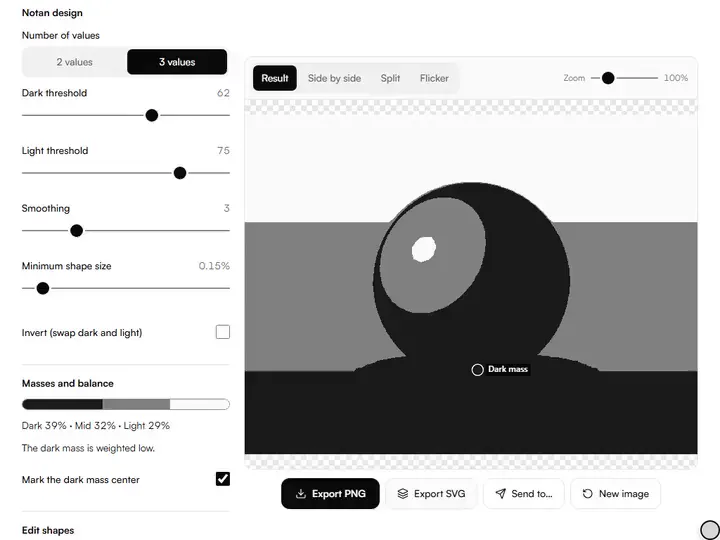
What the Notan Generator does
The Notan Generator judges a composition as shape: a perceptual cut, smoothing before it, specks absorbed, and the photo kept beside the design.
Composition judged as shape
The Notan Generator cuts a photo into two or three flat value shapes, so a composition is judged on its light–dark pattern alone, before any paint is mixed. Among the value and tone tools for artists, it is the one that tests the design itself rather than measuring individual values.
A perceptual cut
The threshold is applied to OKLab lightness, not to a plain average of the red, green and blue channels. Strong blues and reds are therefore sorted by how light they look, not by their raw channel values.
Smoothing before the cut
Smoothing blurs the lightness map, from off up to 12, before the threshold is applied, so foliage or fabric texture averages out instead of breaking a shape apart.
Specks absorbed, not erased
Minimum shape size finds islands smaller than a set share of the picture, from 0 to 2%, and hands their pixels to the neighboring shapes that surround them. The design keeps its area; it only loses the confetti.
The photo beside the design
Split, Side by side and Flicker views set the notan against the original photograph, so each flat shape can be traced back to the object that produced it.
Private, full-size output
All processing happens in your browser, and the photo never leaves your device. The PNG export is recomputed from the full-resolution image, not the 1,600-pixel preview.
Worked examples from the Notan
Each picture is what this tool exported from one of the sample photos you can load in it.
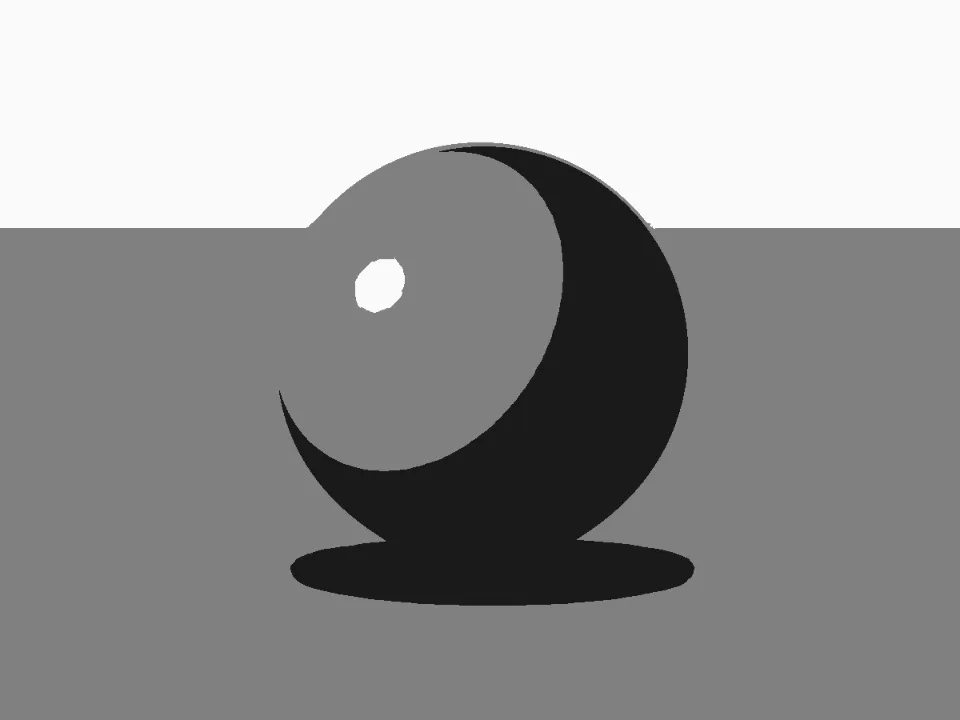
A lit sphere in three values
- What was set
- The Portrait sample (a single lit sphere), 3 values.
- Why
- Three values give light, shadow and a middle grey for the ground. If the form still reads as round with only these, the lighting is strong enough to paint.
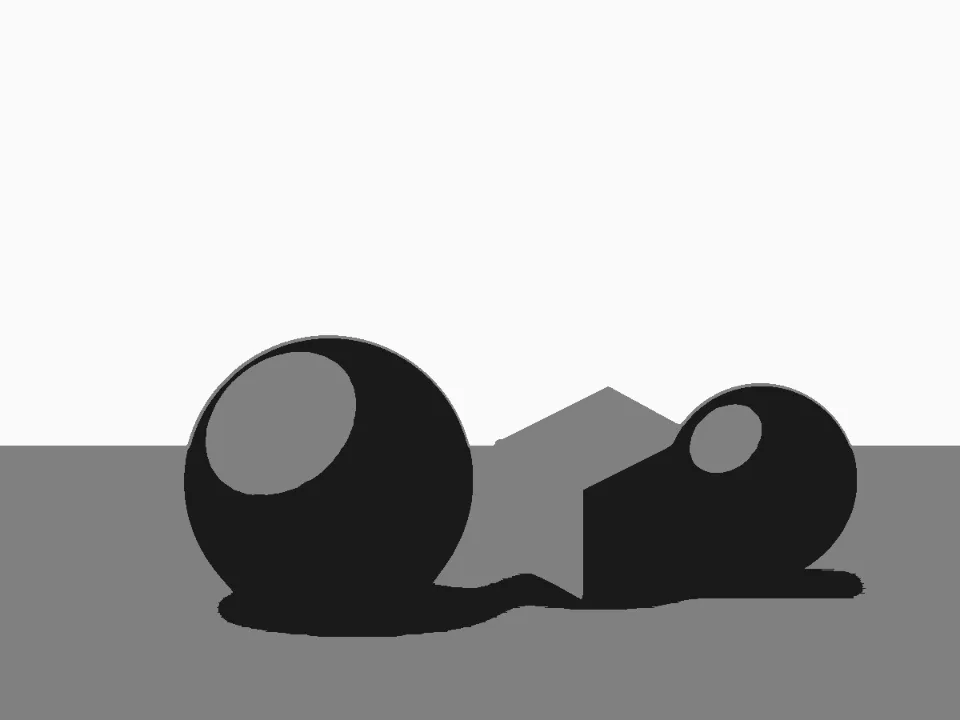
A still life in three values
- What was set
- The Still life sample, 3 values.
- Why
- With several objects the question is whether they join into a few big shapes or break into many small ones. The notan shows the shadow shapes linking the objects to the table.
For artists who settle the design first
Working painters, art students, illustrators and art teachers use a notan to settle the design before the detail.
Working painters
Working painters can project the SVG export onto a large canvas and lay in the big dark shapes before any color goes down.
Art students
Art students can run one reference at 2 values, then at 3 values, and see exactly where the middle grey changes the design.
Illustrators
Illustrators can set the Dark and Light swatches to two ink colors and export a flat two-color layout as vector shapes.
Art teachers
Art teachers can print the thumbnail sheet to show a class ten readings of the same photo and debate which design is strongest.
What notan is and why painters use it
A notan study reduces a scene to flat shapes, traditionally black and white, so the composition can be judged as pure design. The idea entered Western art teaching in the late nineteenth century and stayed because it works: a picture that holds as two flat tones usually holds when rendered.
The test is ruthless. Stripped of color and detail, a picture has only its light and dark shapes: many promising photos fail as the darks fragment, the lights form no shape and the eye has nowhere to rest.
Three-value notan adds a middle grey, which is closer to how most paintings are organized: a dominant mid-value field against a dark accent and a light accent.
The settings, explained
Threshold decides where the cut between dark and light falls; moving it migrates whole shapes across. In 3-value mode, Dark and Light threshold set the two breaks independently.
Raise Minimum shape size from the default 0.15% until only deliberate shapes remain. For very textured photos, flatten them first in the image simplifier.
The color swatches accept any colors, and an earth-tone notan (burnt umber on raw sienna, say) makes a handsome underpainting plan.
From notan to canvas
Edit shapes turns the generator into a design tool. Flip shape swaps one connected shape to the next value, and the paint tools force dark or light where the photo disagrees with your plan. Edits stay put when the threshold moves, and the dark mass marker shows how each change shifts the balance.
The PNG suits a monitor or tablet.
A practical sequence: find the threshold where the design holds, note the proportion of dark to light, then check the same reference in the value study maker at four or five steps to plan the middle values. Notan decides the poster; the value study decides the painting.
Further reading
The page below goes further into the ideas the Notan Generator works with, and opens on the site named beside it.
- Composition, value and the role of notan (ArtisticMasterclass.com)
Tips from a working artist
From Sujith Puthran, artist and founder: what I actually do at the easel.
If the notan fails, don't force it: crop the reference tighter or move to a different photo. A notan that won't resolve is telling you something true.
Squint at your finished notan and compare it to squinting at the actual subject. When they match, you've learned to see the subject as design. That's the real skill being trained.
Common mistakes, and the fix
The 3 mistakes below are a threshold left where it started, every speck kept, and a notan judged at full size.
Leaving the threshold where it started
The first threshold is only a starting point. Move the Threshold slider until the dark and light shapes make a design you would hang on the wall; the best notan is rarely the middle setting.
Keeping every speck
A notan full of small islands is a photograph, not a design. Raise Smoothing and set a Minimum shape size until what is left could be cut from two sheets of paper.
Judging it at full size
A design that works does so at the size of a stamp. Switch on Thumbnail sheet and choose from the small versions, not the large one.
Why your picture stays on your device
The Notan is a program your browser downloads and runs by itself. When you choose a picture, the browser reads it from your files and does the work on your own phone or computer; no copy is sent to this site or to anyone else, and what you export is saved straight from the browser. That is why there is nothing to upload and nothing to sign up for. The privacy page says what the site does collect.
Questions about the Notan Generator
The 6 questions below cover design choices, the settings behind specks and the thumbnail sheet, then the SVG file and privacy.
Design choices
What makes a good notan?
A good notan has a few large, clearly separated shapes with one dominant value, and an interesting balance between dark and light. If the notan looks fragmented or evenly split, the composition will struggle no matter how well it is painted.
Should I use 2 values or 3?
Use 2 values to start. It is the strictest test of the design. Use 3 when you are ready to think about the middle value, which is where most of a painting usually lives. Many artists do a 2-value check first, then a 3-value plan.
The settings
Why is my notan full of specks and noise?
Your notan is full of specks and noise because photo texture shatters the shapes. Raise Smoothing to merge fine detail into the surrounding value, and increase Minimum shape size so small islands are absorbed into their neighbours.
What does the Thumbnail sheet compare?
The Thumbnail sheet compares ten versions of the same photo. Five are two-value notans with the threshold at your setting and 8 and 16 points either side, then the same five as three-value notans, keeping the gap between your dark and light thresholds. Click one to use its settings, or print the sheet as a PDF.
Files and privacy
What is the SVG export for?
The SVG contains the notan as clean vector shapes, so it scales to any size without losing sharpness. Artists use it for large projections, printmaking and stencil prep, and cutting machines.
Does the Notan Generator upload my image?
No, the Notan Generator does not upload your image.
Load a reference, sweep the Threshold and keep the version whose shapes still read at thumbnail size.
Free · No sign-up · Runs in your browser
Why next: When the two- or three-value design holds, open it out into the four or five steps you will paint.
Why next: Check the real values of the reference behind the design, point by point.
Why next: Simplify the photo first if the notan keeps breaking into small shapes.
Last updated 2026-09-28 · Built by Sujith Puthran