Free Color Palette Extractor
Extract the true palette of any image (with each color's share, value and codes) and take it into Photoshop, GIMP, Procreate or your stylesheet. Exports PNG, ASE, GPL, CSS and JSON. Free, with no sign-up, and your picture never leaves your device.
Drop an image here, or paste from clipboard
Your image stays on your device. Nothing is uploaded.
JPG, PNG, WebP, GIF, AVIF or BMP
Number of colors.Set anywhere from 3 to 12 colors; the palette is recalculated as soon as the slider moves.
Sort by Share, Value, Hue.Reorder the swatches by how much of the image they cover, from lightest to darkest, or around the hue circle.
Copy a hex code.Click any swatch to copy its hex code; the card under it lists the color's share and its value.
Export palette as.Download the palette in 11 formats, from ASE and Procreate to Aseprite's JASC PAL, or as a PNG strip sized by share.
- Free
- No sign-up
- Runs in your browser: your image never leaves your device
What is a color palette extractor?
A color palette extractor finds the few colors an image is built from and reports how much of the picture each one covers. This one groups the pixels in OKLab, snaps every swatch to a color that really occurs in the photo, finds small vivid accents, and gives each its share and value.
How to use the Color Palette Extractor
The tool takes 5 steps, all on your device.
Drop or paste an image, or click “Choose image”. Nothing leaves your device.
Set how many colors you want: 5–7 reads like a painter's palette; 10–12 captures nuance.
Sort by Share to see which colors dominate, by Value to read the light–dark structure, or by Hue to see the color families.
Click any swatch to copy its hex code, or “Mix this” to open it as a target in the paint mixer. Drag a numbered marker on the photo to pick a color by hand.
Download the palette as ASE, ACO, Procreate, GPL, ACT, JASC PAL, Paint.NET, CSS, JSON, SVG or PNG, or export a PNG strip sized by share.
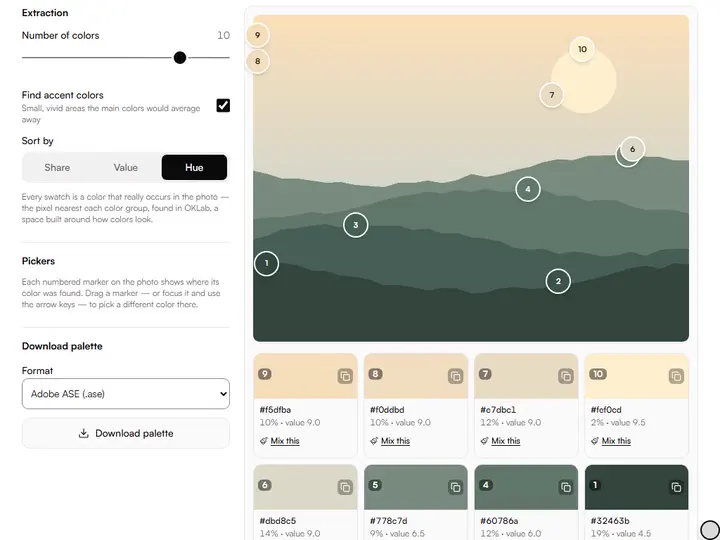
What the Color Palette Extractor does
The Color Palette Extractor groups a picture's colors by k-means, gives each swatch its proportion and its value, and returns the same palette every run.
Proportion, not only hue
The Palette Extractor reports the percentage of the image each color covers, so it tells you how much of each mix a painting needs as well as which mixes. Among the color tools for artists on this site, it is the one that starts from a finished image and works backward to the colors that built it.
k-means clustering
The extractor groups up to 40,000 sampled pixels in OKLab, a color space built around how colors look, with k-means++ seeding. Each swatch is then snapped to the real pixel nearest its group's center, and a marker shows where it was found.
Values on the 1–10 scale
Each swatch shows its value on the artist's scale, where 1 is the darkest dark and 10 is white, read from OKLab lightness in half steps. Sorting by Value turns the palette into a tonal ladder you can mix against.
The same palette every run
The clustering starts from a fixed seed, so one image at one color count returns the same swatches each time. The color count and sort order are also kept in the page address, so a bookmarked link reopens with those settings.
Transparent areas left out
Pixels that are mostly transparent are skipped before clustering. A cut-out PNG therefore gives the palette of the subject alone, with no empty background in the shares.
Processed on your device
The image is decoded and clustered by your browser, in a background worker, and no pixel data is sent to a server.
For planning mixes and building swatch sets
Working painters, illustrators, art students and art teachers pull a palette from a picture to plan mixes or build swatch sets.
Working painters
Sort a reference by Share before a session to see which two or three mixes need the largest piles on the palette.
Illustrators
Export the palette as a Procreate .swatches file or an ASE to paint a digital piece in a reference's own colors.
Art students
Extract a master painting at five or six colors and sort by Value to see how the picture was keyed.
Art teachers
Print the PNG strip, where each band's width matches its color's share, as a handout for a palette-planning lesson.
Why extract a palette instead of guessing one
Painters have always premixed palettes: stringing out the colors a subject actually needs before touching the canvas. Working from an extracted palette does the same job digitally: instead of mixing from an infinite color picker, you work from the five to eight colors that genuinely carry the image. That constraint is not a limitation; it is how paintings get their unity. When every mix on your palette descends from the same handful of parents, the picture harmonizes itself. The masterwork palette library shows the same measurement for 30 public-domain paintings, from Duccio to Henri Rousseau.
Proportions are where the surprises sit. The color that sets a photo's mood can cover a small corner of it, while a muted neutral fills most of the frame. The Share sort makes that visible with the percentage of the image each color covers: the most useful number when you are deciding how much of each paint to mix.
A fixed set of tubes is the same idea taken one step further. The Zorn palette of yellow ochre, cadmium red, ivory black and white is one well-known example, and the limited palette previewer remaps a whole image onto only the colors those paints can mix.
Reading the value column
Sort by Value and you get the tonal skeleton of the image, lightest swatch first. The numbers use the same OKLab lightness as the Value Checker's default mode. If the extracted palette clusters in values 4–6, the picture is mid-key and will look dull unless you deliberately extend the range; if it spans 2–9, the image already has the contrast structure of a strong painting. Reading that spread is a quick way to see why a reference excites you or leaves you flat.
Which export for which app
ASE loads into the Swatches panel of Photoshop, Illustrator and InDesign, and ACO is Photoshop's own swatch file. GPL is GIMP's format, read by Inkscape, Krita and Aseprite; JASC PAL and ACT suit pixel-art and older Adobe tools; the .swatches file opens in Procreate. CSS, JSON and SVG serve design work, and the PNG strip, colors sized by their proportion, is the one to pin above your easel. For Clip Studio Paint, or to move a palette file you already have from one app to another, use the palette format converter.
From palette to painting
The extracted hex codes are screen colors; paint behaves differently. A swatch becomes tubes on your palette through pigment mixing: paste its hex code into the target field of the paint mixing simulator, which searches for a recipe of real pigments using Kubelka–Munk subtractive mixing.
Further reading
The page below goes further into the ideas the Color Palette Extractor works with, and opens on the site named beside it.
- Handprint: the geometry of color and palette design (handprint.com)
Tips from a working artist
From Sujith Puthran, artist and founder: what I actually do at the easel.
Five colors is usually enough. If the extracted palette has three near-identical neutrals, lower the color count: k-means splits big clusters first.
Sort by Value before a painting session: premix a light, a mid and a dark string from your palette and the value structure is solved before you start.
For portraits, extract from the face region only (crop first with the Crop to Canvas Size tool): background colors pollute the flesh palette.
Keep the PNG strip beside your canvas. Matching a mix to a printed target beats mixing toward a glowing screen.
A palette says which colors are in the picture. The Photo to Paint Recipe Sheet says how to mix each of them from one set of paints.
Why your picture stays on your device
The Palette Extractor is a program your browser downloads and runs by itself. When you choose a picture, the browser reads it from your files and does the work on your own phone or computer; no copy is sent to this site or to anyone else, and what you export is saved straight from the browser. That is why there is nothing to upload and nothing to sign up for. The privacy page says what the site does collect.
Questions about the Color Palette Extractor
The 6 questions below explain extraction and dull swatches, the percentage and value on each swatch, then file formats and privacy.
Using it
How do I extract a color palette from an image?
Drop your image into this tool: it groups the pixels in OKLab and shows the dominant colors, snapped to real pixels, with their share, hex codes and values, plus any small vivid accents. Then download the palette for Adobe apps, Procreate, GIMP, Aseprite or CSS.
Why do the swatches look duller than the brightest spots in my photo?
The swatches should not look duller than the brightest spots in your photo: each swatch is the photo's own pixel nearest its group's center, not an average. Small, intense passages that no main color covers are listed separately as accents when “Find accent colors” is on; raising the Number of colors also gives them groups of their own.
Reading swatches
What does the percentage on each swatch mean?
The percentage on each swatch means the share of image pixels closest to that color: how much of the picture that color actually covers. Painters use it to decide how much of each color to mix.
What is the value number on each swatch?
The value number on each swatch is the color's lightness on the 1–10 artist value scale, computed in perceptual OKLab space. 1 is the darkest dark, 10 is white. Sort by value to read the image's tonal structure.
Files and privacy
Which format does Procreate use?
Procreate uses the .swatches format: choose the Procreate export, then open the downloaded file on your iPad and it appears as a new palette.
Is my image uploaded to a server?
No, your image is not uploaded to a server. The extraction runs entirely in your browser; the image never leaves your device.
Drop in a reference, set the color count and take its palette to the easel or into your painting app.
Free · No sign-up · Runs in your browser