Free Artwork White Balance & Color Fix
Fix the color of artwork photos from one neutral click, the unpainted margin or a ColorChecker chart, then fine-tune temperature, tint, exposure and levels, and apply the same fix to a whole series. Exports JPG, PNG and ZIP. Free, with no sign-up, and your picture never leaves your device.
Drop an image here, or paste from clipboard
Your image stays on your device. Nothing is uploaded.
JPG, PNG, WebP, GIF, AVIF or BMP
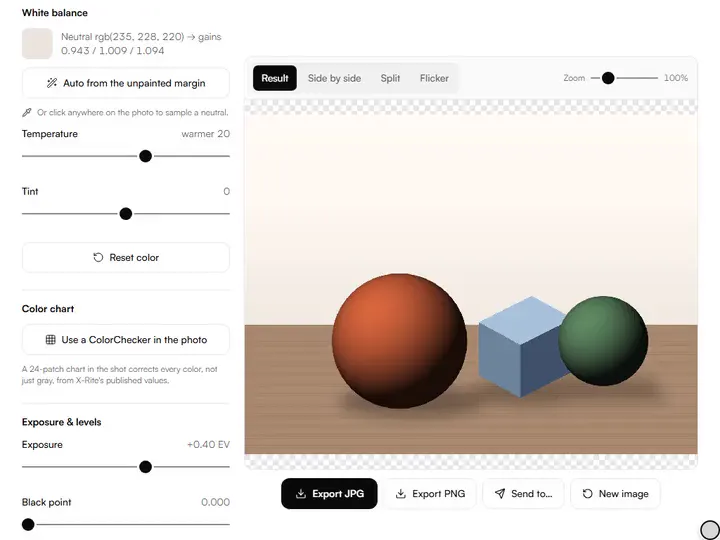
White balance click.Clicking the photo samples a 13 × 13 pixel patch and sets three channel gains that turn its color gray.
Exposure and levels.Exposure runs from −2 to +2 EV, while Black point and White point set where the tonal range starts and ends.
Glare recovery.Glare recovery, from 0 to 100 percent, bends the brightest highlights into a soft shoulder instead of a hard clip.
ColorChecker chart.Mark a ColorChecker Classic's corners and a matrix fitted to X-Rite's published values corrects every color, error shown before and after.
- Free
- No sign-up
- Runs in your browser: your image never leaves your device
What is white balance correction?
White balance correction is the adjustment that removes a color cast from a photo by making a surface known to be neutral render as gray, then applying the same change to every other color. Here you click a neutral patch or let the tool find the unpainted margin; a ColorChecker in the shot corrects every color.
How to use the Artwork White Balance & Color Fix
The tool takes 5 steps, all on your device.
Drop in a photo of your artwork. It is never uploaded.
Click something that should be neutral: white paper, a gray card, an unpainted canvas edge or a white frame mat. The white balance is set from that click, or press Auto to use the unpainted margin, or mark a ColorChecker in the shot.
Adjust exposure if the shot is too dark or bright, and set the black and white points to use the full tonal range.
Raise glare recovery to gently compress shiny highlight spots back into detail.
Check the before/after split (Show clipping marks blown and crushed areas), then export a full-resolution JPG or PNG, or correct a whole series the same way.
What the Artwork White Balance & Color Fix does
Artwork White Balance & Color Fix takes its gains from one neutral patch, works in linear light, and guards saturation without a hue shift.
Gains from one neutral patch
The white balance comes from the patch you click, or with Auto from the light, low-saturation pixels round the photo's edge: that color is mapped to a gray of the same luminance, and the resulting gains are applied to every pixel. Color is the second fix among the artwork photo tools, after geometry.
Linear-light processing
Every correction runs on linear values: the tool decodes the sRGB file, applies gains, exposure, levels and glare recovery, and then re-encodes it. The gains therefore scale light intensities rather than the encoded curve.
Limits on a mis-click
Each channel gain is held between 0.2 and 5, so a click on a saturated passage cannot drive a channel to zero. Reset white balance returns all three gains to 1.
Hue-preserving saturation guard
The saturation guard scales an out-of-range color down as a whole, which keeps its hue, and pulls a negative channel toward gray instead of clipping it. With the guard off, each channel is clipped on its own.
Full-size export on your device
The preview uses a copy of at most 1600 pixels on the long edge, and the export repeats the correction on the full-size photo in a Web Worker. The photo never leaves the browser, and Match a series runs the same correction on more photos, one at a time, into one zip.
Correction kept in the link
The gains or chart matrix, Temperature, Tint, Exposure, levels, Glare recovery and the saturation guard are stored in the page address, so a bookmarked link reopens the same correction.
For artists documenting finished work
Working painters, artists who sell, illustrators and art students correct the color of documented work with it.
Working painters
Glare recovery softens the shiny highlight spots that studio lamps leave on a varnished oil painting.
Artists who sell
One click on the unpainted canvas edge takes the orange cast of warm bulbs out of a shop listing photo.
Illustrators
A click on a drawing's untouched paper margin turns yellowed paper neutral, and White point then brightens it.
Art students
The Split view shows how far the camera's cast shifted a color study before it goes into a portfolio.
Why do artwork photos come out the wrong color?
Artwork photos come out the wrong color because indoor light is never neutral. Tungsten bulbs push everything orange, shady window light goes blue, and mixed lighting does both. Your eyes adapt to the light in the room; the camera records the cast. The result is the familiar photo where a white canvas looks cream, and because the error is multiplicative, every color in the painting shifts with it, not just the whites.
The fix is the same one photographers use: tell the image what neutral is, and let that single correction carry through every pixel of the painting.
Choosing the right neutral to click
Avoid clicking colors from inside the painting itself: clicking a red passage tells the tool "make this gray", which destroys exactly the color you painted. If a click goes wrong, click somewhere else or reset; each click re-derives the gains from the original photo.
The sample is a median over a small square, so a speck of dust or a hot pixel cannot skew it.
Levels, glare and the saturation guard
After white balance, a quick levels pass finishes the job. Photos of artwork often arrive slightly hazy: a small black-point increase restores the punch the painting actually has.
Glare is the enemy of varnished or glossy paint. Glare recovery softly compresses the top of the tonal range (a photographic shoulder, not a hard clip) so blown highlights settle back into detail where any survives. The saturation guard then keeps any color pushed out of range at its own hue.
A repeatable artwork-photography workflow
Geometry first, color second: square the photo in the artwork photo straightener, then balance it here, so the wall no longer competes with the painting while you judge the result. For a body of work, shoot in the same spot at the same time of day with the light at 45° to the surface, put a gray card or ColorChecker in the first frame, correct that one, and match the rest of the series to it.
Further reading
The page below goes further into the ideas the Artwork White Balance & Color Fix works with, and opens on the site named beside it.
- Photographing your artwork: light, angle and color (ArtisticMasterclass.com)
Tips from a working artist
From Sujith Puthran, artist and founder: what I actually do at the easel.
If the painting has an obvious white (paper, gesso, highlights), check after balancing that it reads as white, not gray: nudge the white point until it does.
Compare with the split view zoomed into the darkest shadow. That's where color casts hide.
Shoot slightly dark rather than bright: shadow detail can be lifted, but a clipped channel is gone forever.
White balance corrects color, not exposure. For a reference with blocked shadows, the Reference Shadow/Highlight Recovery tool lifts them area by area.
Why your picture stays on your device
The White Balance is a program your browser downloads and runs by itself. When you choose a picture, the browser reads it from your files and does the work on your own phone or computer; no copy is sent to this site or to anyone else, and what you export is saved straight from the browser. That is why there is nothing to upload and nothing to sign up for. The privacy page says what the site does collect.
Questions about the Artwork White Balance & Color Fix
The 8 questions below cover the click and the order of work, then linear light, the saturation guard, glare and the chart, then files and privacy.
Using it
What do I click to set the white balance?
To set the white balance, click anything that is neutral in reality: white paper, a gray card, an unpainted canvas edge or a white mat.
Should I straighten before or after color correction?
Straighten before color correction. Straightening removes the wall and floor from the frame, so only the artwork is left to judge by eye while you set exposure and levels. The white balance itself depends only on the patch you click.
The method
Why linear light?
White balance is physical: light multiplies. Correcting in linear RGB (after undoing the sRGB gamma) matches how light actually mixes, so one set of gains neutralizes a uniform cast in the shadows and the highlights alike.
What does the saturation guard do?
When a correction would push a color channel past its maximum, the guard scales the whole color down to fit, preserving its hue. Without it, one channel clips and saturated colors such as cadmiums and phthalos shift hue and lose detail.
Can this fix glare spots?
Yes, partly: this tool can fix glare spots that still hold some detail. Glare recovery compresses highlights softly, which recovers detail wherever the sensor still captured some. A fully blown white spot contains no information and can only be re-shot: angle the light at 45° next time.
Which ColorChecker does the chart correction assume?
The chart correction assumes a ColorChecker Classic made in November 2014 or later. Its 24 target colors are the values published for that edition on X-Rite's page of new color specifications. Charts made before then used different colorants, so an older card is corrected less exactly.
Files and privacy
What size is the exported file?
The exported file has the same size in pixels as the photo you loaded, for photos up to 40 megapixels; the tool changes color and never crops. To fit a corrected reference photo to a canvas ratio, crop to canvas size trims it to the canvas's proportions.
Does the Artwork White Balance & Color Fix upload my photo?
No, the Artwork White Balance & Color Fix does not upload your photo. EXIF orientation is respected when the image loads.
- ColorChecker Classic reference: xrite.com/…/ColorChecker24_After_Nov2014.zip · checked 2026-09-29
- ColorChecker Classic reference: xrite.com/…/new_color_specifications_for_colorchecker_sg_and_cl… · checked 2026-09-29
Drop in a photo, click a white or gray patch, and export the corrected image as a full-size JPG or PNG.
Free · No sign-up · Runs in your browser