Free Color Blindness Simulator for Artists
See your reference, palette or painting as viewers with protan, deutan or tritan colour vision, or no colour at all, at any severity from mild to full, with two published models. Compare all four at once, point a live camera at the easel, and for every pair that collapses get the value change that keeps it apart. Exports PNG. Free, with no sign-up, and your picture never leaves your device.
Drop an image here, or paste from clipboard
Your image stays on your device. Nothing is uploaded.
JPG, PNG, WebP, GIF, AVIF or BMP
Severity from mild to full.A slider from 0 to 100%: Machado's published matrices for anomalous trichromacy, or Brettel's dichromat projection blended in.
Four-up.Normal vision, protan, deutan and tritan side by side at the same severity, exported as one captioned PNG.
Live camera.Every camera frame simulated as it arrives; pause it, or freeze a frame as the photo to study.
Fixes by value.For each clashing pair, the smallest value change to either colour that keeps them apart in the simulation.
- Free
- No sign-up
- Runs in your browser: your image never leaves your device
What is a color blindness simulator?
A color blindness simulator redraws an image to approximate how a viewer with a color vision deficiency sees it, so an artist sees whether colors that differ to them stay distinct. This one uses the Machado 2009 or Brettel 1997 model at any severity and suggests value changes for colors that merge.
How to use the Color Blindness Simulator for Artists
The tool takes 6 steps, all on your device.
Drop in your reference photo (it never leaves your device), try a sample, or switch Source to Live camera to simulate the view in front of you.
Choose the deficiency: Protanopia, Deuteranopia, Tritanopia or Achromatopsia.
Set the severity: 100% is dichromacy, one cone type missing; lower values model the milder, more common forms.
Choose the model, Machado 2009 or Brettel 1997, and the layout: the simulation alone, side by side with the original, or Four-up with normal, protan, deutan and tritan views together.
Read the palette clash check: each pair that looks different to you but merges in the simulation comes with the smallest value change that separates it.
Export the view as a PNG, including the four-up grid with captions.
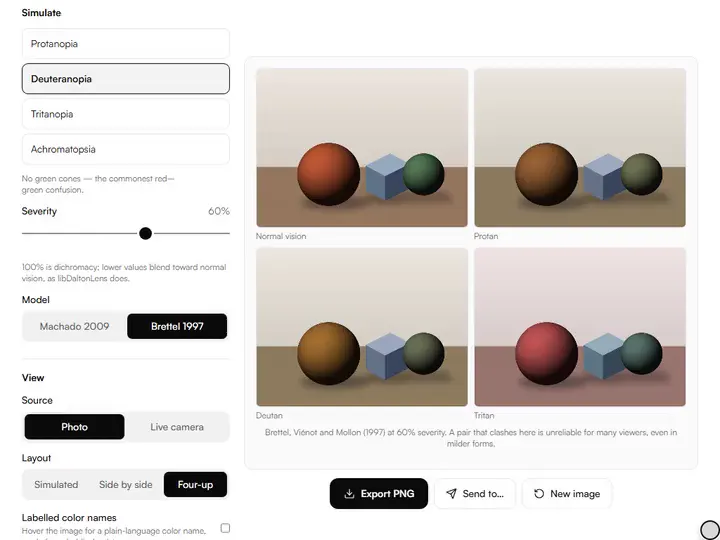
What the Color Blindness Simulator for Artists does
The Color Blindness Simulator for Artists pairs a live simulation from two published models with a clash test at two thresholds, and explains why value is the fix.
Simulation plus a clash test
The Color Blindness Simulator for Artists redraws your image under one of four colour vision deficiencies, then tests the image's own palette for pairs that stop being distinct and suggests how to separate them. Among the color tools for artists, it is the accessibility check.
Two published models
Machado, Oliveira and Fernandes (2009) give a matrix for each deficiency at severities from 0 to 1 in steps of 0.1 (blended between steps), taken from the colour-science library's table. Brettel, Viénot and Mollon (1997) project onto two half-planes in cone space, as precomputed for sRGB by the public-domain libDaltonLens; its outputs agree with the DaltonLens-Python reference within two 8-bit codes. Both work in linear light.
Why value is the fix
The common deficiencies change how hues are told apart, not how light and dark are. So each fix keeps a colour's hue and chroma and moves only its value, by the least amount (in steps of the 1 to 10 value scale) that pulls the simulated pair to an OKLab distance of 0.1. A red of #d2281e and a green of #28963c merge under deuteranopia; lifting the green by 0.7 of a value step, or darkening the red by 0.8, keeps them apart.
Two clash thresholds
A pair counts as a clash when its colours are at least 0.12 apart in OKLab to normal vision but no more than 0.06 apart after simulation. The check tests up to 8 dominant colours, found by grouping pixels into 32 levels per RGB channel, so small accents are not tested.
Fast enough to be live
The simulation is one 3 × 3 matrix per pixel in linear light, with tabled decoding and encoding, within two codes of the exact computation; the four-up view of a sample is ready in about a fifth of a second and the camera is simulated frame by frame.
Processing on your device
The simulation, camera, palette and clash check all run in your browser, and nothing is uploaded or recorded. Previews use a copy up to 1,600 pixels on the long edge; Export PNG simulates the full-resolution photo exactly.
For artists checking work against colorblind eyes
Illustrators, colorblind painters, art teachers and artists who sell check a picture against colorblind eyes.
Illustrators
Check a finished piece in Four-up and apply the suggested value fixes before the file goes out.
Colorblind painters
Set the simulation and severity to your own vision, point the live camera at the palette, and use the named colours as a second opinion.
Art teachers
Show a class the same reds, greens and blues at 30%, 60% and 100% severity to explain the range of colour vision.
Artists who sell
Export the deutan view of a listing image and check that the piece still reads before you publish it.
Why simulate color blindness
Some viewers are missing one cone type or have one that responds differently, and pairs that separate clearly for you can merge for them. The simulator does not 'fix' your image; it approximates what a colorblind viewer sees, so you can decide whether the composition, accent placement or palette needs adjustment.
For colorblind artists the tool works the other way round. Choose the simulation and severity that match your own vision, and the clash panel lists pairs a colour-normal viewer sees as different even when they look alike to you.
Severity and the two models
Colour vision deficiencies range from mild anomalous trichromacy, where one cone type responds shifted, to dichromacy, where it is missing. Machado's model describes the milder forms directly, one matrix per severity, so the slider below 100% shows anomalous trichromacy as that model defines it. Brettel's model describes dichromacy; below 100% it blends the dichromat view with normal vision, the way libDaltonLens offers severity.
The two models differ most for tritan colour vision: across a sweep of 1,331 colours at full severity, their results are on average 0.042 apart in OKLab for tritan, against 0.020 for protan and 0.011 for deutan. Comparing them is a quick way to see how robust a finding is.
Reading the clash warnings and fixes
With up to 8 dominant colours, the check tests up to 28 pairs. A clash is a pair that is clearly different to a colour-normal eye but collapses under the chosen simulation, such as the red and green a deuteranope cannot tell apart. For each, the panel offers the smaller fix on each colour, with the simulated pair after the change shown beside it.
If the pair serves the same role, two background greens say, the clash is harmless. If it separates an accent from its field, apply a fix; a value difference also survives in the Achromatopsia view. The hue value chroma separator shows which of hue, value and chroma a pair shares.
From simulation to a safer palette
Check each deficiency in Four-up, apply the smallest value fix to the weaker member of each clashing pair (often the accent), and check again. For a longer palette of the same reference, the color palette extractor pulls 3 to 12 colours with their proportions, and you can recheck any doubtful pair here.
Further reading
The 2 pages below go further into the ideas the Color Blindness Simulator for Artists works with, and each opens on the site named beside it.
Tips from a working artist
From Sujith Puthran, artist and founder: what I actually do at the easel.
Start with deuteranopia: it is the view the tool opens on and shows red and green confusions first.
Check at a milder severity too: a pair that only merges at 100% is a smaller risk than one that merges at 50%.
Separate a clashing pair by value as well as hue, so it still reads in the Achromatopsia view.
Point the live camera at your palette while mixing to catch a clash before it reaches the canvas.
Why your picture stays on your device
The CB Simulator is a program your browser downloads and runs by itself. When you choose a picture, the browser reads it from your files and does the work on your own phone or computer; no copy is sent to this site or to anyone else, and what you export is saved straight from the browser. That is why there is nothing to upload and nothing to sign up for. The privacy page says what the site does collect.
Questions about the Color Blindness Simulator for Artists
The 5 questions below cover the severity slider, the two models and darker reds, then value fixes and privacy.
The simulations
What does the severity slider change?
The severity slider changes how far the view goes toward dichromacy: at 100% it shows dichromacy, one cone type missing. Below that, the Machado model uses its published matrix for that degree of anomalous trichromacy, and the Brettel model blends the dichromat view with normal vision. Achromatopsia blends toward a grey of the same luminance.
Which model should I use?
You can use either model for red and green deficiencies, where the two agree closely. The two differ most for tritan vision (about four times as much as for deutan, measured across a colour sweep), so for blue and yellow questions it is worth comparing the two.
Why does Protanopia make reds look darker?
Protanopia makes reds look darker because it removes the long-wavelength (red) cones, which carry much of a red's brightness. In this tool a red of RGB 200, 40, 40 becomes a dull olive brown of 92, 82, 38 under Protanopia with the Machado model.
Fixes, camera and privacy
Why are the fixes value changes?
The fixes are value changes because colour-blind viewers read light and dark normally, so separating two colours by value keeps them apart for everyone while each keeps its hue.
Does the Color Blindness Simulator for Artists upload my photo?
No, the Color Blindness Simulator for Artists does not upload your photo.
- Colour vision deficiency models: doi.org/10.1109/TVCG.2009.113 · checked 2026-09-29
- Colour vision deficiency models: doi.org/10.1364/JOSAA.14.002647 · checked 2026-09-29
Drop in a finished piece, compare the four views at a chosen severity and apply the value fixes the clash panel suggests.
Free · No sign-up · Runs in your browser