Free Paint Mixing Simulator
Mix artist pigments by parts with real Kubelka-Munk paint physics, and reverse-search recipes for any color you're trying to match. Exports PNG and PDF. Free, with no sign-up, and it runs in your browser.
Your mix
…
Simulated with Kubelka-Munk pigment mixing from each paint's masstone color: a guide, not a guarantee; test on a scrap of your surface.
Send to…
Open this result in another tool. It stays on your device.
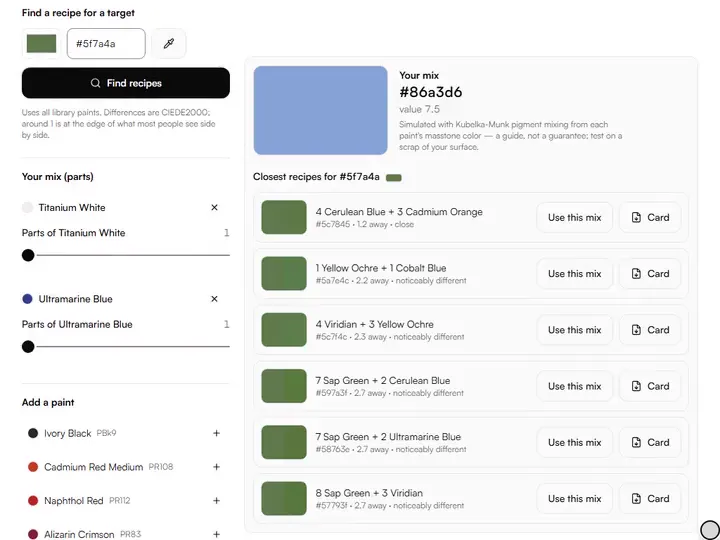
Parts sliders.Set each paint in your mix from 1 to 12 parts; the result swatch, hex code and value update with every change.
Pigment library.Add any of 22 artist pigments, each listed with its pigment code, such as PB29 for Ultramarine Blue.
Find recipes.Pick or type a target hex code, press Find recipes, and get the six closest mixes with a Use this mix button.
Recipe card.Print any recipe as a one-page card, paints in mixing order with parts, shares and pigment codes.
- Free
- No sign-up
- Runs entirely in your browser
What is a paint mixing simulator?
A paint mixing simulator is a tool that predicts the color pigments make when mixed by parts, modeling how paint absorbs and scatters light instead of averaging screen colors. This one mixes 22 common artist pigments with Kubelka-Munk equations, reports the result's hex code and 1–10 value, and searches recipes for a target color.
How to use the Paint Mixing Simulator
The tool takes 5 steps, all on your device.
Your mix starts with two pigments. Add more from the library: 22 common artist pigments with their real codes.
Adjust the Parts sliders: 3 parts white to 1 part blue is written 3:1, exactly like a studio recipe.
Read the result swatch with its hex and value. Blue plus yellow turns green here, because paint is subtractive, not additive.
To match a color, enter or pick the target and press Find recipes: every paint alone, every pair and every white- or black-anchored triple is tried, the best are fine-tuned, and proportions are rounded to whole parts.
Press Use this mix to load a recipe, or Card for a printable recipe card in mixing order. Tick the paints you own, and add your own tubes under My paints.
What the Paint Mixing Simulator does
The Paint Mixing Simulator mixes pigments and not light, solves recipes in whole parts, and gives the value of every mix.
Pigment mixing, not light mixing
The Paint Mixing Simulator mixes pigments with the Kubelka-Munk model through spectral.js, so blue and yellow make green instead of the gray you get by averaging their RGB values. It belongs to our color tools for artists, which work from paint on a palette rather than from light on a screen.
Recipes in whole parts
Recipes are written in whole parts, such as 3× Titanium White + 1× Ultramarine Blue, so a ratio transfers straight to knife-scoops on the palette. Whole numbers also scale cleanly when you need a larger batch of the same color.
A solver, not a lookup
Each search simulates about 9,000 mixes (every paint alone, pairs at seven ratios, triples anchored on white or black), then fine-tunes the best proportions, rounds them to at most 12 whole parts and ranks them by CIEDE2000, with a small handicap per extra paint so simpler recipes win near-ties.
Value of every mix
The value readout converts the mixed color's OKLab lightness to the artist's 1–10 scale in half steps, so a mixture's value can be checked before its hue.
Mixes saved in the link
The current mix and the target color are stored in the page address. A copied link reopens the same pigments, parts and target on another device.
Masstone pigment colors
Pigment colors are approximate masstone sRGB values, normalized from handprint.com and manufacturer color charts, not measured spectral data.
For painters who plan a mix before they squeeze paint
Beginners, art students, working painters and art teachers plan a mix on screen before squeezing any paint.
Beginners
Beginners can start from the default mix of Titanium White and Ultramarine Blue and move one Parts slider to see a tint form.
Art students
Art students can mix Ultramarine Blue with Burnt Sienna at different ratios and read how each change moves the hex code and value.
Working painters
Working painters can type the hex code of a passage in a reference and take a two- or three-pigment recipe to the palette.
Art teachers
Art teachers can project the result swatch and change one pigment's parts at a time to show a class how a ratio shifts a color.
Why doesn't paint mix like screen colors?
Paint doesn't mix like screen colors because screens add light and paint subtracts it. Every pigment absorbs some wavelengths and reflects the rest, and when you mix two pigments you multiply their absorptions, which is why ultramarine and yellow give you green, and why red and green paint make mud instead of gray light. This tool models that with the Kubelka-Munk equations, the standard approximation of pigment mixing used in the coatings industry.
The practical consequence every painter learns the hard way: mixing always costs chroma. Every added pigment subtracts more light, so mixtures are duller than their parents.
How to use recipes in the studio
A recipe is written in parts by volume: a palette-knife scoop, a pea-sized squeeze, whatever unit you keep consistent. 2:1 ultramarine to burnt sienna is the classic workhorse neutral; add white and it becomes the entire architecture of a cloudy sky. When the finder gives you a recipe, treat the ratio as the starting point and adjust by eye on the palette: pigment lots vary, brands differ, and your surface changes everything.
The number under each recipe is the CIEDE2000 difference between the simulated mix and your target. Around 1 is at the edge of what most people see side by side, under 2 is close, and above 4 a recipe is a direction, not a destination. For a whole face, the skin tone mixing guide builds every zone from one mother colour with the same mixing model.
Building a mixing intuition
Mixing is learned by prediction: guess the result before you look. Try cadmium red plus ivory black (you get a surprisingly violet maroon: black is blue-biased). Try cerulean plus raw umber. Try the same recipe with phthalo blue swapped for ultramarine and watch how far the result moves at the same ratio. Twenty minutes of this builds more intuition than a shelf of color theory books, because the feedback is immediate and the physics is real.
Once you know what a pigment does in a mix, you can plan a palette: take a photo's true colors with the color palette extractor, find recipes for the three or four dominant ones, and premix those strings before you start the painting.
Further reading
The page below goes further into the ideas the Paint Mixing Simulator works with, and opens on the site named beside it.
- Handprint: how pigments mix (Kubelka-Munk in practice) (handprint.com)
Tips from a working artist
From Sujith Puthran, artist and founder: what I actually do at the easel.
Keep mixes to three pigments or fewer: each addition subtracts light and dulls the result. If a 3-pigment recipe isn't close, change one pigment rather than adding a fourth.
Reach darks with complement + dark pigment (ultramarine + burnt umber) instead of straight black; black mixes read dead in large passages.
Write down the recipes that work. A studio notebook of 'sky over sea, overcast: 4 white : 1 ultramarine : ¼ burnt sienna' compounds in value for years.
Simulated masstones are approximations: always brush out a test on the same surface and light you'll paint in.
To train the eye that judges a mix, the Color Mixing Drill sets a target color and scores each mix you try by color difference.
Questions about the Paint Mixing Simulator
The 7 questions below take mixing theory first, then the recipe finder and its parts, then pigments and the downloaded file.
Mixing theory
What colors make green when mixing paint?
Blue plus yellow make green when mixing paint: ultramarine with a warm yellow gives an earthy green, hansa or lemon yellow with phthalo blue gives a sharp, high-chroma green. Try both in the mixer to see the difference.
Why does my mix look duller than the target?
Your mix looks duller than the target because of real subtractive physics: every pigment added absorbs more light, lowering chroma. The finder shows the honest result. If you need higher chroma, start from a pigment closer to the target hue instead of mixing toward it.
Recipes
How does the recipe finder work?
The recipe finder works by simulation: it simulates every paint, pair and white- or black-anchored triple with Kubelka-Munk mixing, fine-tunes the most promising proportions, rounds them to whole parts, and ranks the results by CIEDE2000 color difference. If nothing you own comes close, it names the one tube that would help most.
How many pigments go into a recipe from the finder?
A recipe from the finder uses two or three pigments: a pair at one of eleven ratios from 9:1 to 1:9, or a trio built on Titanium White or Ivory Black. You can still add more pigments to the mix by hand from the library. To see how far a small set of these same pigments reaches across a whole reference, the limited palette previewer maps an image onto their mixes.
What do 'parts' mean in a recipe?
In a recipe, parts mean parts by volume: any consistent unit (a knife-scoop, a pea-sized squeeze). 3:1 white to blue means three units of white to one of blue.
Pigments and files
What does the downloaded recipe contain?
The downloaded recipe is a plain-text file with one line per pigment, giving its parts, name and pigment code, followed by the result's hex code and its value on the 1–10 scale. Export PNG saves a separate 800 × 400 px swatch of the mixed color.
Are the pigment colors exact?
No, the pigment colors are not exact: they're careful masstone approximations of 22 common pigments, normalized from published pigment references. Brands and batches vary, so use recipes as starting points and test on your real surface.
Set the parts, read the swatch and its value, then brush the recipe out on the surface you will paint on.
Free · No sign-up · Runs in your browser