Free Art Metadata Editor & AI Opt-out Tagger
Read everything a photo file says about you, take out the location or the camera details, and write your name, copyright and AI-training choice into up to 100 files at once. The picture itself is never re-saved, and each saved file is opened again to prove what it now says. Exports JPG, PNG, WebP and ZIP. Free, with no sign-up, and your picture never leaves your device.
Drop up to 100 JPEG, PNG or WebP files
Files are read in your browser. Nothing is uploaded, and the picture itself is never re-saved.
Four tables per file.Location, Camera, Rights and description, and Other, with each row marked EXIF, IPTC, XMP or PNG.
Location only.Removes the GPS position and place names and leaves every other field as it was.
Your rights preset.Creator, copyright notice, credit line, usage terms, contact and the AI training field, written to the whole batch of up to 100 files.
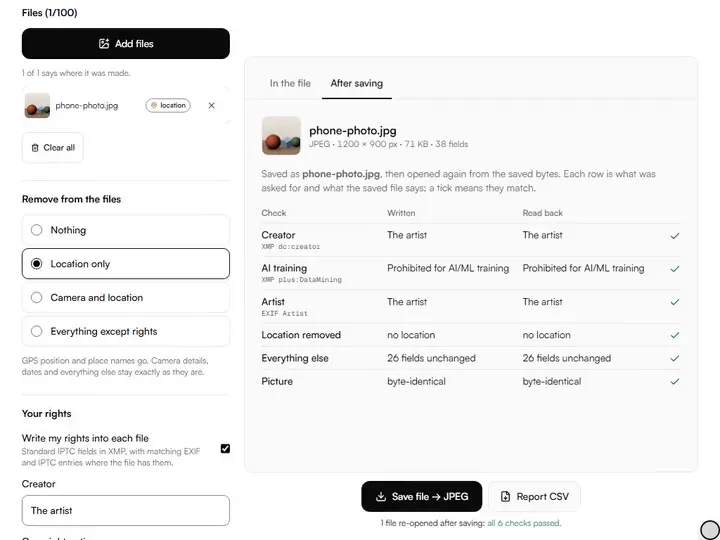
After saving.Each saved file is opened again and every field is shown as written and as read back.
- Free
- No sign-up
- Runs in your browser: your image never leaves your device
What is an image metadata viewer?
An image metadata viewer is a tool that lists the information stored inside a photo file beside the picture: camera and lens, date, GPS position, and rights fields such as creator and copyright notice. This one also removes location or camera details and writes an artist's rights into the file without re-saving the picture.
How to use the Art Metadata Editor & AI Opt-out Tagger
The tool takes 6 steps, all on your device.
Add files (up to 100 JPEG, PNG or WebP images) or try the Phone photo sample.
Read the four tables for the selected file. A file that says where it was made is flagged at the top and in the file list.
Under Remove from the files, choose Nothing, Location only, Camera and location, or Everything except rights.
Under Your rights, fill in Creator, Copyright notice, Usage terms and AI training. They are kept on this device as your preset.
Give the selected image its own Title and Alt text under This image only.
Save, then open the After saving tab to see each field as written and as read back.
What the Art Metadata Editor & AI Opt-out Tagger does
The Art Metadata Editor & AI Opt-out Tagger writes rights fields without re-saving the picture, removes location in place, and keeps three metadata blocks in step.
The picture is never re-saved
The metadata editor changes only the blocks of the file that hold text about the picture. The compressed image data is copied through byte for byte, so there is no second round of JPEG compression, and the last row of the read-back table confirms it for every file. It sits with the other artwork photo tools as the last step before a file leaves your studio.
Location removed in place
Location only takes the GPS entry out of the EXIF block and overwrites the coordinates with zeros without changing the block's length. Camera makers keep private data in the same block, addressed by position, and it stays valid because nothing moves. Place names in the IPTC and XMP blocks go too.
Three blocks kept in step
Rights are written as XMP fields from the IPTC Photo Metadata Standard. A JPEG also gets the EXIF Artist and Copyright tags, and older IPTC entries are updated where a file has them, so an old name is not left in one block to contradict the new one.
The AI training field
The AI training choice is written as the PLUS Data Mining property that the IPTC standard added in version 2023.1, with values such as 'Prohibited for AI/ML training'.
Embedded thumbnails shown
A camera can store a small copy of the photo inside the file. The Camera table lists that thumbnail with its size, and Camera and location removes it.
A report with the batch
A batch downloads as a ZIP that keeps your file names and adds a CSV report with one line per check: the value written, the value read back and the result.
How it compares with other free metadata tools
Each tool was given the same JPEG with a GPS position, camera details and an embedded thumbnail on 1 October 2026, and its output was read with ExifTool.
| Feature | This tool | exif.tools | Jimpl | metadata2go |
|---|---|---|---|---|
| File stays on your device | Yes | Yes | No | No |
| Removes location and nothing else | Yes | No | No | Longitude stayed |
| Keeps orientation when it removes | Yes | Yes | No | Yes |
| Writes rights fields | Yes | No | No | Existing fields only |
| AI training (Data Mining) field | Yes | No | No | No |
| Reads each saved field back | Yes | No | No | No |
| Files per batch, no account | 100 | 1 | 1 | 3 |
All four left the picture data byte-identical.
For artists who post, submit and sell images
Working painters, draughtsmen, illustrators and artists who sell tag the images they post, submit and sell.
Working painters and draughtsmen
Photograph work at home, then use Location only before posting so the file does not carry the address.
Illustrators
Keep one preset with usage terms and the AI training field, and write it into every portfolio export in one batch.
Artists who sell
Give each listing image its own Title and Alt text, and send a gallery a file that names you in every block.
What a photo file says besides the picture
Image metadata is text stored in the file next to the pixels. A phone or camera writes an EXIF block: maker, model, lens, exposure, the date, often a serial number, and a GPS position when location is on. Photo software adds two more blocks, the older IPTC entries and XMP, which hold the words people add: creator, copyright notice, title, keywords, city and country.
None of it shows when the picture is viewed, and all of it travels with the file. For a painting photographed on the kitchen table, the GPS position is a home address.
Removing metadata without damaging the picture
The common way to strip a photo is to draw it on a canvas and save a new JPEG. That drops the metadata, compresses the picture a second time and discards its colour profile. The watermark tool works that way on purpose, because it has to change the pixels.
This tool edits the file's structure instead. A JPEG is a row of labelled segments followed by the compressed picture, and only the metadata segments are rewritten. The colour profile, orientation and resolution always stay, because they decide how the picture is displayed.
The three remove settings
Location only removes GPS coordinates, altitude, direction and GPS time, and the city, region, country and sub-location fields. Camera and location also removes maker and model, lens, serial numbers, exposure settings, software name, the maker's private data and embedded thumbnails; capture dates, rights, titles and keywords stay. Everything except rights keeps creator, copyright, credit, usage terms, contact, title, description, keywords and alt text, and removes the rest.
What the rights fields can and cannot do
Metadata states your terms; it does not enforce them. The Data Mining field records a prohibition in the place the standard defines, and IPTC notes that regional law may overrule the value chosen. A crawler can ignore it, and a screenshot makes a new file without it.
Platforms differ too. When IPTC tested social media sites in 2019, files saved from Twitter came back with their metadata stripped, Facebook kept only a few fields, and Flickr and Behance kept it. Check a platform by downloading your own image and reading it here.
Formats and limits
JPEG, PNG and WebP are read and written; HEIC, TIFF, GIF and AVIF are not read. EXIF text tags hold plain ASCII, so © is written there as (c) and accented letters lose their accents, while XMP keeps every character as typed. In PNG and WebP files the EXIF tags are updated only where the file already has an EXIF block.
Further reading
The page below goes further into the ideas the Art Metadata Editor & AI Opt-out Tagger works with, and opens on the site named beside it.
- Photographing and sharing your artwork on Artistic Masterclass (ArtisticMasterclass.com)
Tips from a working artist
From Sujith Puthran, artist and founder: what I actually do at the easel.
Before I post a painting photographed at home, I run Location only and check the top line says the file no longer knows where it was made.
I keep the copyright notice as © year name, and put how to license the image in Usage terms.
Why your picture stays on your device
The Metadata is a program your browser downloads and runs by itself. When you choose a picture, the browser reads it from your files and does the work on your own phone or computer; no copy is sent to this site or to anyone else, and what you export is saved straight from the browser. That is why there is nothing to upload and nothing to sign up for. The privacy page says what the site does collect.
Questions about the Art Metadata Editor & AI Opt-out Tagger
The 6 questions below cover batch size and the rights preset, then what changes in the file, and privacy.
Using it
How many files can I process at once?
You can process 100 files at once.
Where does the rights preset come from?
The preset is whatever you last typed under Your rights, kept in this browser. An empty preset is filled from your studio profile if the invoice or certificate tool has saved one.
What changes in the file
Which fields does the tool write?
The tool writes the fields creator, copyright notice, credit line, usage terms, licensing page, contact email and website, title, alt text and the Data Mining value, all as XMP.
What does the After saving tab prove?
The After saving tab proves what the saved bytes contain. It compares each saved file with what you asked for: the fields written, the fields that should be gone, the fields that should be unchanged, and the picture data against the original.
Does removing location also remove the date?
No, removing location does not also remove the date. Location only leaves the capture date and time.
Privacy
Does the Art Metadata Editor & AI Opt-out Tagger upload my files?
No, the Art Metadata Editor & AI Opt-out Tagger does not upload your files.
- File metadata, rights fields: iptc.org/…/exclude-images-from-generative-ai-iptc-photo-metadat… · checked 2026-10-01
- File metadata, rights fields: exiftool.org · checked 2026-10-01
- File metadata, rights fields: iptc.org/…/social-media-sites-photo-metadata-test-results-2019 · checked 2026-10-01
Add your photos, remove the location, write your rights once and download files that have been checked.
Free · No sign-up · Runs in your browser