Free Blind Contour Timer
A calm timer for blind contour drawing. Keep your eyes on the subject and draw on your own paper while the screen shows the subject large, keeps time and says the rule: pure blind, timed glances, one continuous line, or your other hand. Exports CSV. Free, with no sign-up, and your picture never leaves your device.
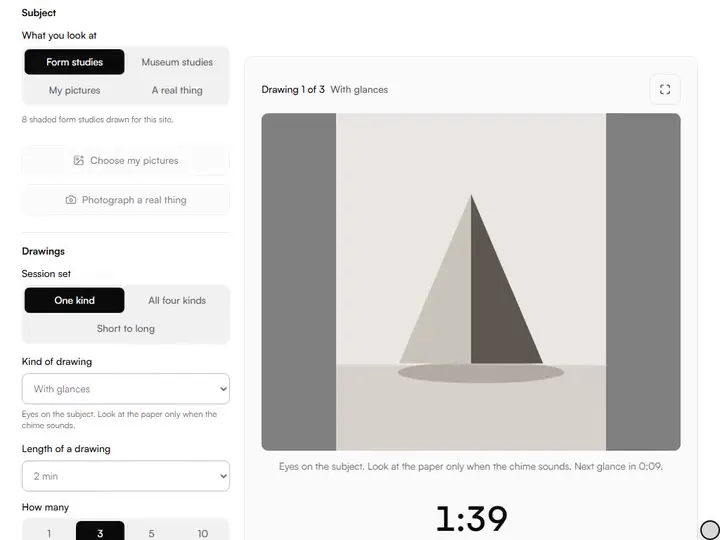
6 min 25 s in all, with 5 seconds to get set and 10 seconds for each new sheet. Keep your eyes on the subject and draw on your own paper; the screen keeps time and says the rule. Nothing is uploaded.
%22%2F%3E%3C%2Fsvg%3E)

%22%2F%3E%0A%20%20%20%3Cellipse%20cx%3D%22300%22%20cy%3D%22290%22%20rx%3D%22120%22%20ry%3D%2234%22%20fill%3D%22%23dedad2%22%2F%3E%0A%20%20%20%3Cellipse%20cx%3D%22300%22%20cy%3D%22290%22%20rx%3D%22120%22%20ry%3D%2234%22%20fill%3D%22none%22%20stroke%3D%22%23b7b2a8%22%20stroke-width%3D%223%22%2F%3E%3C%2Fsvg%3E)
%22%2F%3E%3C%2Fsvg%3E)
%22%2F%3E%3C%2Fsvg%3E)
%22%2F%3E%0A%20%20%20%3Ccircle%20cx%3D%22292%22%20cy%3D%22268%22%20r%3D%2292%22%20fill%3D%22url(%23stTop)%22%2F%3E%3C%2Fsvg%3E)

%22%2F%3E%0A%20%20%20%3Cellipse%20cx%3D%22444%22%20cy%3D%22446%22%20rx%3D%2242%22%20ry%3D%2258%22%20transform%3D%22rotate(-15%20444%20446)%22%20fill%3D%22%23d9d4cb%22%2F%3E%3C%2Fsvg%3E)
A page that hides your lines until you ask to see them.
Four kinds of drawing.Pure blind, with timed glances, one continuous line, or the other hand. The rule stays on screen.
Glances on a chime.A chime every 15, 30 or 60 seconds opens three seconds to look at the paper. A second chime closes it.
The subject, large.Form studies, museum studies, your own pictures, or a photo taken on the spot. Nothing is uploaded.
Time that holds.The clock is read off the real time, so a tab left in the background comes back to the right second.
- Free
- No sign-up
- Runs in your browser: your image never leaves your device
What is blind contour drawing?
Blind contour drawing is an exercise in which you draw the edges of a subject while looking only at the subject, never at the paper. The pencil moves slowly, at the pace of the eye, usually in one unbroken line. The drawing comes out distorted; the purpose is to train looking, not to make a likeness.
How to use the Blind Contour Timer
The tool takes 6 steps, all on your device.
Choose what you look at: Form studies, Museum studies, My pictures, or A real thing in front of you.
Choose a Session set, the Kind of drawing and the Length of a drawing.
For drawings with glances, choose A glance every 15, 30 or 60 seconds.
Choose Start session, put the pencil on the paper and fix your eyes on the subject.
Draw until the chime. Take a new sheet in the pause, or choose Next drawing to move on sooner.
Read the results, and choose Export history (CSV) to keep them.
What the Blind Contour Timer does
The Blind Contour Timer is made for the one exercise: session sets, a subject when you have none, and chimes set ahead of time.
A timer made for the exercise
Among the drawing practice tools, this one keeps your eyes off the paper. It names the rule of each drawing and reminds you to cover the page.
Session sets
So many drawings of one kind, one drawing of each of the four kinds, or one, two and five minutes in a row.
A subject when you have none
For a real thing in front of you, ask for a subject from the site's 603 hand-written drawing prompts.
Chimes set ahead of time
Every chime is handed to the browser's audio clock when the session starts, so it does not wait for the page to notice the time.
For the easel
Full screen, a screen that stays awake, a clock you can hide, and Pause and Next drawing within reach.
History on your device
Each session is charted and exports as a spreadsheet file. Sessions go to your practice log if you turn that on.
How it compares with other tools
Each was used in a browser on 2 October 2026. Only what was seen is stated.
| Feature | This tool | DoodleLab Blind Draw | Art Teacher Tools timer |
|---|---|---|---|
| What it is | A timer for drawing on paper | A game: draw a word on a hidden canvas | A timer over its own photo library |
| What you look at while drawing | Form or museum studies, your pictures, or a real thing | A word | Its own photos |
| Glances allowed on a chime | Yes | No | No |
| Length of a drawing | 30 seconds to 10 minutes | No clock seen | 30 seconds to 8 minutes, or custom |
| Your own pictures | Yes | Not seen | Not seen |
| Where you draw | On your own paper | On screen, unseen until the reveal | On your own paper |
| What happens to the drawing | Nothing: it is not judged | A robot guesses what it is | Nothing: it is not judged |
| Other servers the page contacted | None | 2 | 4 |
DrawGestures, a gesture drawing timer, asked for a sign-in before its timer opened and was not tried.
For anyone learning to look
Beginners, life drawers and teachers use blind contour to learn to look.
Beginners
A first exercise in drawing what you see in front of you and not what you know is there.
Life drawers
A few blind contours to warm up the eye before a longer pose.
Teachers
Put the subject on the projector and let the chimes tell the room when to glance down and when to look back.
Blind contour drawing, timed
In a blind contour drawing the eye follows the edge of the subject and the pencil follows the eye. You do not look at the paper. Kimon Nicolaïdes set the exercise out in The Natural Way to Draw, published in 1941, and Betty Edwards later taught it as pure contour drawing, according to Wikipedia's article on blind contour drawing.
A timer helps because every look at a clock is a look away from the subject. Here a chime begins the drawing and a chime ends it.
The four kinds
Pure blind: eyes on the subject for the whole drawing. With glances: eyes on the subject, with a short look at the paper each time the chime sounds, to find your place again. Continuous line: blind, and the pencil never leaves the paper, so the whole drawing is one line. Other hand: blind, with the hand you do not write with, which slows the line down.
Before each drawing there is a short pause for a new sheet, with a reminder of a way to keep the paper out of sight.
How the glances work
Choose a glance every 15, 30 or 60 seconds. At that moment a rising chime sounds and the screen says to glance at the paper. Three seconds later a low chime sounds and the eyes go back to the subject. The screen counts down to the next glance, and the results say how many were offered.
A glance is left out if the drawing would end before your eyes had been back on the subject for three seconds. If no glance fits, the page says so before you start. These rules are this tool's own.
Keeping time when the tab is not in front
Browsers slow a page in a background tab, and a timer that counts ticks falls behind. This one works out from the real time which drawing you are in and how many seconds are left, so it is right however long the page was away.
The chimes are set against the audio clock at the start. A locked phone can still silence a web page, so the tool asks the screen to stay awake during a session.
Blind contour drawing exercises to try
Your free hand, three times, one minute each, in a different pose each time. One object drawn in all four kinds, two minutes each, to feel how each rule changes the line. A house plant for one, two and five minutes: the long drawing is where the eye has time to slow down. A face in a mirror, with a glance every 30 seconds.
For gesture and timed poses, use the gesture drawing timer. For an idea of what to draw next, use the drawing prompt generator.
What it leaves out
You do not draw on the screen: this is an exercise for paper. The camera takes a still photo of the thing in front of you; it does not show a moving view while you draw. There are no levels, points or leaderboards.
Further reading
The page below goes further into the ideas the Blind Contour Timer works with, and opens on the site named beside it.
- Drawing and painting lessons on Artistic Masterclass (ArtisticMasterclass.com)
Tips from a working artist
From Sujith Puthran, artist and founder: what I actually do at the easel.
I start with my own hand. It is always there, it holds a pose, and its creases give the eye something slow to follow.
When the line runs off the paper I leave it. The drawing is a record of where my eye went, and I do not correct it.
Why your picture stays on your device
The Blind Contour is a program your browser downloads and runs by itself. When you choose a picture, the browser reads it from your files and does the work on your own phone or computer; no copy is sent to this site or to anyone else, and what you export is saved straight from the browser. That is why there is nothing to upload and nothing to sign up for. The privacy page says what the site does collect.
Questions about the Blind Contour Timer
The 6 questions below cover the method, continuous line, timing and wrong-looking results, then your data and the practice log.
The exercise
How do you do blind contour drawing?
To do a blind contour drawing, fix your eyes on one point on the edge of the subject and put the pencil on the paper. Move your eye slowly along the edge and move the pencil at the same speed, without looking down. Keep going until the time is up.
What is the difference between blind contour and continuous line drawing?
The difference between blind contour and continuous line drawing is in the rule: in a blind contour you do not look at the paper. In a continuous line drawing the pencil does not leave the paper. A blind continuous line drawing does both, which is the Continuous line kind here.
How long should a blind contour drawing take?
A blind contour drawing can take as long as you choose: there is no fixed rule. This timer offers 30 seconds to 10 minutes.
Why does my blind contour drawing look wrong?
Your blind contour drawing looks wrong because you could not see where the pencil was. Lines overlap and proportions wander. That is expected: the drawing is not what the exercise is for.
Your data
Does the Blind Contour Timer upload my pictures?
No, the Blind Contour Timer does not upload your pictures.
Can sessions go to my practice log?
Yes, once you turn on Add sessions to my practice log. It is off until you turn it on.
- Rules of its own, one history note: en.wikipedia.org/wiki/Blind_contour_drawing · checked 2026-10-02
Three two-minute drawings, a chime to begin each one and a chime to stop.
Free · No sign-up · Runs in your browser