Free Color Wheel & Harmony Tool
Two wheels in one: the painter's RYB wheel for pigment thinking and the perceptual OKLCH wheel for screen work, with harmonies and a built-in value check. Exports PNG, CSS and JSON. Free, with no sign-up, and your picture never leaves your device.
Complementary
Value check
The same harmony stripped of hue. If the grays are nearly identical, the palette relies on hue alone. It will fall apart in a black-and-white reproduction.
- v6
- v8
Send to…
Open this result in another tool. It stays on your device.
Wheel type.Switch between RYB (paint) and OKLCH (digital); the disc redraws and every harmony color is recalculated in that space.
Gamut masks.Lay a triad, complementary or analogous mask on the wheel, rotate it or drag its corners, and apply it to a photo.
Harmony.Choose complementary, split complementary, analogous, triadic, tetradic or a five-step monochromatic ramp.
Value check.A row of gray chips repeats the harmony with the hue removed, each labeled with its value from 1 to 10.
- Free
- No sign-up
- Runs in your browser: your image never leaves your device
What is a color wheel?
A color wheel is a circle of hues arranged so that the relationships between colors, such as complements and neighbors, are read from their positions. This one offers the painter's RYB wheel and the perceptual OKLCH wheel, six harmonies, a value check, and gamut masks you can apply to a photo.
How to use the Color Wheel & Harmony Tool
The tool takes 5 steps, all on your device.
Choose the wheel: RYB (paint) for traditional pigment complements, OKLCH (digital) for perceptually accurate hue spacing.
Click anywhere on the wheel to set a base color, or type or paste a hex code, with or without the #.
Pick a harmony: complementary, split-complementary, analogous, triadic, tetradic, or a monochromatic value ramp.
Read the value chips under each swatch: a strong palette needs contrast in value as well as hue.
Optional: lay a gamut mask on the wheel, drag its corners, and add a photo to see it repainted inside the mask. Click a swatch to copy its hex, or download a palette file.
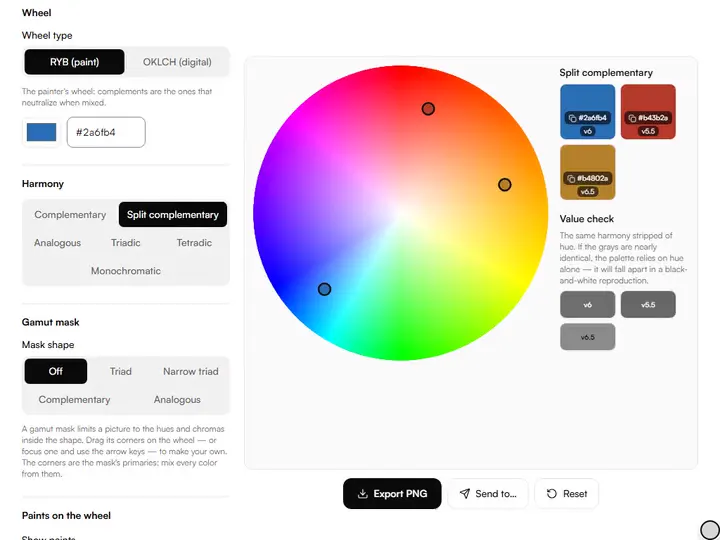
What the Color Wheel & Harmony Tool does
The Color Wheel & Harmony Tool sets a paint wheel beside a light wheel, places harmonies at fixed angles, and masks your photo with them.
A paint wheel and a light wheel
The Color Wheel keeps the painter's RYB wheel beside the perceptual OKLCH wheel, because a complement in paint and a complement on screen are different colors: RYB puts green opposite red, while RGB wheels put cyan there. Among the color tools for artists on this site, it is the one for choosing hue relationships before any paint is mixed.
Harmonies as fixed angles
Each harmony is a set of fixed angles from the base hue: 180° for complementary, 150° and 210° for split complementary, 30° either side for analogous, 120° steps for triadic and 90° steps for tetradic. On the RYB wheel those angles are measured around the painter's circle, not the screen's.
Masks applied to your photo
A gamut mask limits a picture to the hues and chromas inside a shape on the wheel. Applied to a photo, each pixel outside it moves to the mask's nearest edge but keeps its lightness, so values survive. Your paints and their Kubelka-Munk mixing paths can be plotted over it.
OKLCH holds lightness
OKLCH harmonies keep the base color's OKLab lightness and chroma, and chroma is reduced only where a hue falls outside the sRGB gamut. The value chips therefore come out nearly level, so value contrast in a digital scheme has to be added by hand.
A five-step single-hue ramp
The monochromatic mode builds five steps of the base hue from dark to light. On the RYB wheel they are two shades, the color at strength and two tints toward white; on the OKLCH wheel they are set by perceptual lightness.
Schemes kept in the link
The base color, wheel type and harmony are stored in the page address, so a copied or bookmarked link reopens the same scheme. Every color is calculated in the browser, with nothing sent to a server.
For choosing a scheme at the easel or on screen
Beginners, working painters, illustrators and art teachers choose a color scheme with it, at the easel or on screen.
Beginners
Start on the RYB (paint) wheel with Complementary to find the color that grays your base when the two are mixed.
Working painters
Try a split complementary scheme on the RYB wheel and read the value row before committing a palette to canvas.
Illustrators
Build a flat-color scheme on the OKLCH (digital) wheel, then download it as CSS, JSON, ASE or SVG for your design files.
Art teachers
Show the colored swatches above the value check row to demonstrate that hue contrast and value contrast are separate.
Why there are two wheels
The RYB wheel is the painter's wheel: red, yellow and blue as primaries, arranged so that opposite colors neutralize each other when mixed as paint. Its complement of red is green, because red and green paint mix toward gray, and that's the relationship you exploit when you mute a passage or make a color vibrate against its opposite.
The OKLCH wheel is the honest digital wheel: hues spaced by perceived difference, not by arithmetic. HSV hue angles are evenly spaced numbers, so equal steps look unequal as you travel around the circle; OKLCH evens that out. Use it wherever the final medium is light rather than pigment.
Harmonies, and what they're actually for
Complementary pairs create maximum chromatic vibration: the orange against blue of a sunset, the red berries against green leaves. Split-complementary keeps that energy with less risk of garishness. Analogous schemes (neighbors on the wheel) suit calm subjects: autumn foliage, skin in shadow, sea and sky. Triadic and tetradic schemes give you three or four anchor hues. They need one dominant color and the rest in small doses, or the picture turns into confetti.
Monochromatic mode produces a five-step value ramp of a single hue, the structure of a one-color underpainting. When you need the same hue lightened with white, darkened with black and grayed down, the tint, shade and tone generator builds all three ramps, with a real-paint model beside the digital one.
The value check is the real test
Every harmony here shows its colors twice: in hue, and stripped down to gray on the 1–10 value scale. A palette whose grays all sit on one step has no structure. It depends entirely on hue contrast, which disappears in dim light, in black-and-white reproduction and for viewers with color-vision deficiency. Strong palettes read in gray first: light accent, mid masses, dark anchor. If the value row looks flat, darken one harmony member and lighten another before you commit.
A reference photo makes a useful test for a scheme. The color palette extractor pulls the dominant colors out of an image with their share and value, so you can compare a real subject's value spread with the chips of the harmony you picked.
Further reading
The page below goes further into the ideas the Color Wheel & Harmony Tool works with, and opens on the site named beside it.
Tips from a working artist
From Sujith Puthran, artist and founder: what I actually do at the easel.
Pick the harmony in RYB if you'll paint it in oils or acrylics. Its complements neutralize correctly when mixed. Use OKLCH when the final work stays digital.
Let one color dominate. A triadic scheme at 60/30/10 proportions reads as designed; at equal shares it reads as noise.
Mute at least one member of any harmony: three fully saturated colors fight; two saturated plus one grayed is a classic working palette.
Check the value row in a squint: if you can't tell the chips apart with blurred eyes, add value contrast before adding more hues.
Why your picture stays on your device
The Color Wheel is a program your browser downloads and runs by itself. When you choose a picture, the browser reads it from your files and does the work on your own phone or computer; no copy is sent to this site or to anyone else, and what you export is saved straight from the browser. That is why there is nothing to upload and nothing to sign up for. The privacy page says what the site does collect.
Questions about the Color Wheel & Harmony Tool
The 7 questions below compare the RYB and OKLCH wheels, then cover harmony and the value check, and end with exporting.
The two wheels
What is the difference between the RYB and OKLCH wheels?
The difference between the RYB and OKLCH wheels is what each is built on: RYB is the traditional painter's wheel where complements are colors that neutralize each other as paint (red opposite green). OKLCH is a perceptually uniform digital wheel where hue steps look equal to the eye. Use it for screen work.
How is the RYB wheel built?
The RYB wheel maps painter's hues onto screen hues in straight segments between six anchors: red, orange, yellow, green, blue and violet sit 60° apart and map to screen hues of 0°, 30°, 60°, 120°, 240° and 285°. It is a practical approximation of the paint wheel, not a pigment simulation.
Why does OKLCH sometimes shift my color slightly?
OKLCH sometimes shifts your color slightly because highly chromatic hues can exceed what screens can display; the tool reduces chroma just enough to stay inside the sRGB gamut while keeping the hue and lightness you chose.
Harmony and value
Which color harmony should I use?
Use a complementary color harmony for maximum contrast, analogous for calm natural schemes, triadic for lively variety with one dominant color, monochromatic for a value study of a single hue.
What is the value check row?
The value check row shows each harmony color converted to its gray equivalent on the 1–10 artist value scale. If the grays look identical, the palette has no tonal structure and will fail in black-and-white reproduction.
Why do my OKLCH harmony colors all have the same value?
OKLCH harmonies land on the same value, or within half a step of it, because the wheel turns the hue while holding the base color's lightness constant. Switch to the RYB wheel for values that vary by hue, or darken and lighten members yourself after export.
Exporting
Can I export the harmony?
Yes, you can export the harmony as a PNG strip or a palette file for Adobe apps, Procreate, GIMP, Krita, Aseprite, Paint.NET, CSS, JSON or SVG, with the mask's primaries and center when a mask is on.
Set a base color, try each harmony on both wheels and keep the scheme whose value row shows a clear light, middle and dark.
Free · No sign-up · Runs in your browser