Free Sketch Cleaner
A sketch cleaner for photos and scans of drawings: it evens out the lighting, turns the paper pure white and keeps your marks as you made them, with their greys or as pure line. Specks, smudges and blue construction lines can go. On your device; nothing is uploaded. Exports PNG, SVG and ZIP. Free, with no sign-up.
Drop a photo or scan of a sketch
One page or a whole sketchbook, up to 20. They stay on your device: nothing is uploaded.
Uneven light, evened out.The page's shading and tint are measured from the page itself and divided out, corner to corner.
Your marks, not new ones.Nothing is redrawn. Each mark is the one you made, with its grey, or cut to pure line if you ask.
Under-drawing out.Non-photo blue or red pencil is dropped; the graphite or ink over it stays.
PNG, transparent PNG, SVG.White paper, no paper at all, or the lines' centers as strokes for a vector program.
- Free
- No sign-up
- Runs in your browser: your image never leaves your device
How do I clean up a scanned drawing?
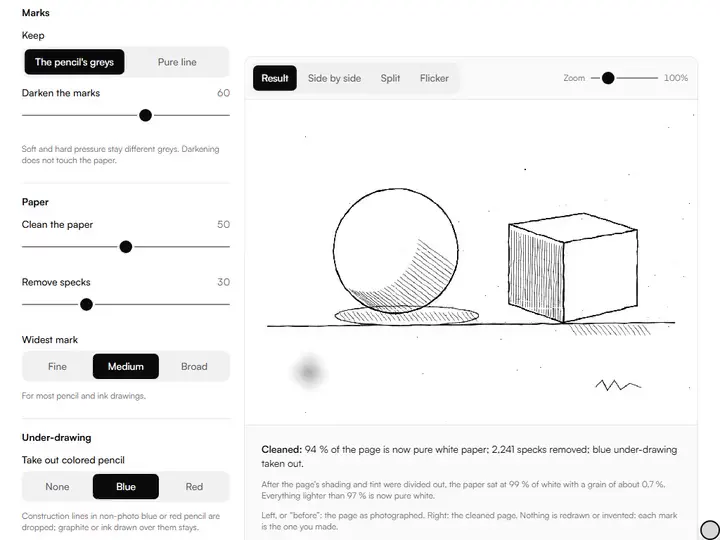
Clean up a scanned drawing in three steps. Even out the lighting so the paper is one tone, set a white point just under that tone so the paper goes pure white, then darken the marks if they look faint. This tool does the first two by itself when you choose the page.
How to use the Sketch Cleaner
The tool takes 6 steps, all on your device.
Choose a photo or scan of a sketch, or several pages at once.
Choose The pencil's greys to keep soft and hard pressure, or Pure line for black on white.
Raise Clean the paper until the page is white and the faintest marks you want are still there.
Set Remove specks for dust, and Under-drawing to Blue or Red to drop construction lines.
Switch on Rub out by hand and drag over a smudge or a stray mark.
Export PNG, white or transparent, or in Pure line an SVG of the lines' centers.
What the Sketch Cleaner does
The Sketch Cleaner measures the paper, removes it and its specks, darkens the marks, and works through a whole sketchbook.
Between sketchbook and screen
One of the artwork photo tools: the step after photographing a drawing and before inking, coloring or printing it.
The paper, measured
The page says what tone the paper sat at and how coarse its grain is, and where the white point was set.
Specks
Groups of marked pixels below a size you set are removed. A long thin line is never a speck.
An eraser
Rub out a smudge, a coffee ring or a page number by hand.
Darker marks, same paper
Darkening deepens the marks and leaves the white alone.
A whole sketchbook
Up to 20 pages with the same settings, saved as one ZIP.
How it compares with other ways to clean a sketch
Each was given the same page in a browser on 3 October 2026: this tool's sample, a line drawing on cream paper lit from one corner, with blue construction lines, a smudge and dust. Results were read from the file each tool gave back. Only what was measured or seen is stated.
| Feature | This tool | RemoveWhite | ImageOnline Threshold (Adaptive) | ImageOnline Remove White Background |
|---|---|---|---|---|
| Paper clean in the light corner | 100 % | No file without paying | 100 % | 0 % |
| Paper clean in the dark corner | 100 % | No file without paying | 100 % | 0 % |
| Pencil's greys kept | Yes | Not measured | No: two tones | Yes: page unchanged |
| Blue under-drawing | Removed | No control for it | Turned black | Unchanged |
| The smudge | Rubbed out by hand | No control for it | Turned black | Unchanged |
| Specks removed by size | Yes | No | No | No |
| Lines as SVG strokes | Yes | No | No | No |
| Download | Free | Day pass €3.99 or year pass €39.99 | Free | Free |
| Other servers the page contacted | None | 6 | 21 | 46 |
RemoveWhite shows a free preview and has threshold, feather, edge-shrink and darken-lines sliders and WebP export; it says it works in the browser with no upload. ImageOnline's remover is made for white backgrounds and was tried at its opening settings, which leave cream paper alone. Pixelcut's AI sketch cleanup page returned an error on the day and was not tried.
For artists who draw on paper and finish on a screen
Illustrators, comic artists, printmakers, tattoo artists and students draw on paper and finish on a screen.
Illustrators and comic artists
Pencils or inks cleaned for coloring, with the paper gone.
Printmakers and tattoo artists
A drawing as pure line, ready to transfer or to trace.
Students
Sketchbook pages photographed on a desk, made fit to hand in or post.
Why does a photographed sketch look grey?
A photographed sketch looks grey because a phone held over a sketchbook records the room as well as the drawing. Light falls off across the page, the paper takes the color of the lamp, and its grain shows as fine noise. Raising brightness or contrast moves all of it together. The corner near the window goes white while the far corner is still grey.
The paper is the lightest thing in every part of the page, so the page's own shading can be read from it. The tool spreads the lights of a small copy of the picture until the drawing is covered, which leaves the paper's color at every point, and divides the picture by that. The shading and the tint both come out as white.
Cleaning the paper without losing light marks
After the shading is gone the paper is a narrow band of tones just under white: its grain. The tool measures where that band sits and how wide it is, and sets the white point below it. Clean the paper moves the white point: higher takes out coarser grain and, with it, the faintest pencil marks.
A scanner's page is flatter than a phone's, and needs less. If light construction lines vanish, lower Clean the paper; if a grey veil stays, raise it. The line under the picture says where the white point was set.
Greys or pure line
The pencil's greys keeps what makes a pencil drawing: soft pressure stays light and hard pressure stays dark. It suits a drawing that will be shown as a drawing, or colored under.
Pure line makes every mark black. Line weight sets the cut: lower keeps only the darkest core of each line, higher keeps its soft edge too. From pure line the tool can also follow each line down its center and write the result as SVG strokes. For a drawing made from a photograph instead, see photo to line art.
Blue pencil, specks and smudges
Animators and comic artists rough in with non-photo blue or red pencil because it can be dropped afterwards. Choose the color and those marks are taken out by their hue; graphite and ink are neutral and stay, even where they cross a colored line.
Dust and stray dots are removed by size, so a short dash you meant can go with them if the setting is high; look at the drawing's small marks before you export. A smudge is neither a color nor a speck, and has to be rubbed out by hand. Marks wider than the Widest mark setting are taken for shading: choose Broad for brush lines and filled shapes.
Further reading
The page below goes further into the ideas the Sketch Cleaner works with, and opens on the site named beside it.
- Drawing lessons on Artistic Masterclass (ArtisticMasterclass.com)
Tips from a working artist
From Sujith Puthran, artist and founder: what I actually do at the easel.
I photograph the page square-on, by a window, with the lamp off. The cleaner the photograph, the less the tool has to guess.
I keep the pencil's greys for anything I will show, and use pure line only for work I am going to ink or cut.
Why your picture stays on your device
The Sketch Cleaner is a program your browser downloads and runs by itself. When you choose a picture, the browser reads it from your files and does the work on your own phone or computer; no copy is sent to this site or to anyone else, and what you export is saved straight from the browser. That is why there is nothing to upload and nothing to sign up for. The privacy page says what the site does collect.
Questions about the Sketch Cleaner
The 6 questions below cover line art, paper backgrounds and pencil, then hollow shapes, redrawing and privacy.
Cleaning a drawing
How do I clean up line art for coloring?
To clean up line art for coloring, choose Pure line, set Line weight until the lines are solid and unbroken, and export a transparent PNG. Put it above the color layer in your painting program; the paper is gone, so color shows through everywhere but the lines.
How do I remove the paper background from a drawing?
To remove the paper background from a drawing, choose Transparent under Background and export PNG. The marks are saved as black with the paper as nothing at all, so the drawing can sit over any color.
Can I clean up a pencil sketch without making it look like ink?
Yes, you can clean up a pencil sketch without making it look like ink. The pencil's greys keeps each mark's own tone and only whitens the paper. Use Darken the marks if the whole drawing is faint.
The tool
Why did a filled black shape come out hollow?
A filled black shape comes out hollow when it is wider than the Widest mark setting, because its middle is then taken for shading on the page. Set Widest mark to Broad.
Does it redraw or tidy my lines?
No, it does not redraw or tidy your lines. It changes tones only: no line is moved, joined, smoothed or invented. The SVG export follows the centers of your own lines.
Are my drawings uploaded?
No, your drawings are not uploaded. They are read and cleaned in your browser, and the page contacts no other server.
White paper, your own marks, and nothing added.
Free · No sign-up · Runs in your browser