Free Background Remover
Cut the background out of object, sculpture and portrait photos with an on-device model, no uploads, then refine the edges, add a contact shadow, frame a marketplace square, or cut out a whole series. Exports PNG, WebP, JPG and ZIP. Free, with no sign-up.
Drop an image here, or paste from clipboard
Your image stays on your device. Nothing is uploaded.
JPG, PNG, WebP, GIF, AVIF or BMP
Remove background.Remove background downloads the model on first use, shows its progress in megabytes, then computes the matte on your device.
Matte refinement sliders.Cut below, Keep above, Feather and Edge shift reshape the model's matte without running the model again.
Restore and Erase brushes.A soft round brush paints the matte toward solid subject or clear background wherever the model guessed wrong.
Background options.Grey, None, Solid and Blur place the cut-out on mid-gray, transparency, a picked color or a blurred copy of the photo.
- Free
- No sign-up
- Runs in your browser: your image never leaves your device
What is a background remover?
A background remover is a tool that separates a photo's subject from its surroundings by computing a matte, a per-pixel value from pure background to pure subject, then replaces the surroundings with transparency or a new backdrop. This one runs the ormbg model in your browser, then lets you refine, shadow and frame the cut-out.
How to use the Background Remover
The tool takes 6 steps, all on your device.
Drop in your photo. It never leaves your device.
Click “Remove background”. The first run downloads the model (about 88 MB, Apache-2.0 licensed); your browser caches it for later visits.
Wait while the model runs on your device: the panel shows the download progress, then “Removing the background…” with the seconds passing; the page stays free to use.
Refine the matte: Cut below and Keep above for edge contrast, Feather for softness, Edge shift to trim or grow the edge.
Paint touch-ups with the Restore and Erase brushes where the model guessed wrong.
Pick a background, add a contact shadow or a Tight or Square frame, and export PNG, JPG or WebP, or cut out a whole series as one zip.
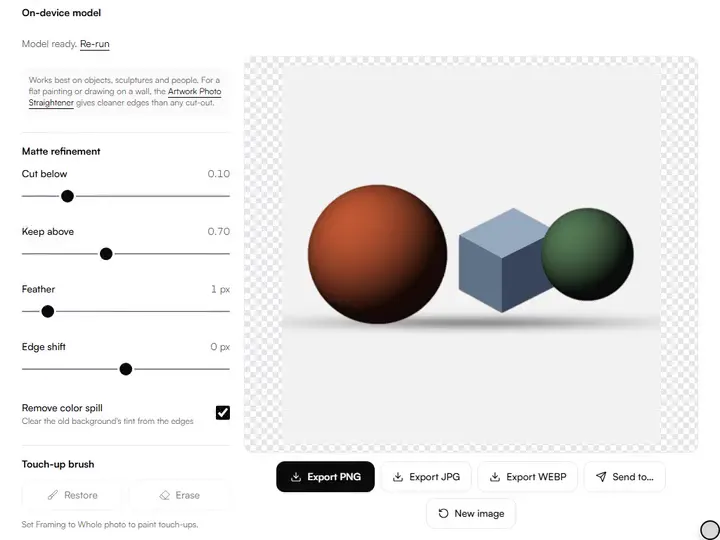
What the Background Remover does
The Background Remover segments the subject on your device, cuts a soft matte in place of a hard mask, and exports at full size.
Segmentation on your device
The Background Remover runs its segmentation model, ormbg (Apache-2.0), inside your browser, so the photo is cut out on your own device and never uploaded. Among the artwork photo tools it covers presentation: lifting a sculpture, ceramic or craft piece out of its setting.
A soft matte, not a hard mask
The model's output is kept as a soft matte, a value from 0 to 1 for every pixel. Compositing mixes subject and background in proportion to that value, so partial edge pixels blend with the new backdrop.
Product shots and spill
Contact shadow sets a soft shadow under the subject's base; Tight and Square frame it with even padding, the square being the shape shop grids use. Remove color spill pulls edge pixels toward the subject's own colors, clearing the old background's tint.
Edge shift in both directions
Edge shift is a morphological filter that moves the matte boundary by up to 10 pixels. Positive values erode it to trim a background fringe; negative values dilate it to win back a clipped edge.
Full-size export
The model and every refinement work on a copy of at most 1024 pixels on the long edge. At export the matte is scaled up and its edge is drawn again from the full-size photo's own colors wherever subject and backdrop differ, then applied to that photo, or to a 40-megapixel copy of a larger one.
Model cached by the browser
Transformers.js keeps the downloaded model in the browser's cache storage. Later runs on the same device read it from there instead of downloading it again.
For artists presenting objects, not flat canvases
Artists who sell, hobbyists, illustrators and art teachers cut objects out of their backgrounds with it.
Artists who sell
One Solid color gives every product photo in a shop the same backdrop, and it stays set when the next photo loads.
Hobbyists
Pottery, carvings and crafts photographed on a kitchen table can go onto the Grey background for a clean record of each piece.
Illustrators
None exports a transparent PNG of a photographed prop or maquette, ready to drop into a layout as a reference layer.
Art teachers
Student sculptures shot in a busy classroom can be cut out and set on one shared Solid color for a class display.
Private by architecture, not by promise
The first press of Remove background fetches the ormbg model from this site, in the half-precision (fp16) ONNX build published by onnx-community, together with the ONNX Runtime files that run it. No other site is asked for anything. Transformers.js then runs the model on your own device. Nothing travels the other way: the photo is decoded, segmented, refined and exported inside the page. For artists photographing unpublished work, that distinction is the whole point.
Getting a clean matte
The model produces a soft matte (a per-pixel probability of subject versus background) and the refinement controls shape that into a final edge. Cut below removes faint background haze; Keep above solidifies the subject's interior; Feather softens the transition so the cut-out doesn't look scissored; and a positive Edge shift erodes the matte inward, which trims the thin halo of old background that clings to dark subjects shot on light walls.
Where the model guesses wrong (a reflective frame edge, a shadow that reads as object, fingers merging with a brush handle), the Restore and Erase brushes paint the matte directly. The brush has a soft falloff, and you're editing probability, not pixels: gentle strokes blend into the surrounding edge.
Choosing what goes behind
None, exported as PNG, is the right default for composite work. Drop the cut-out into marketplace mockups, social graphics or a portfolio layout. Grey sets the subject on a #808080 mid-gray, which avoids the pull of pure white or black: against white a subject reads darker, against black lighter. A solid color works for shop listings that demand consistency, and Blur keeps a softened copy of the original setting: useful for process shots where the studio matters but shouldn't compete.
The cut-out keeps every color of the source photo, including a cast from indoor light. When the new backdrop is a clean gray or white, correct the photo first in the artwork white balance and color fix tool, then cut it out here.
Honest limits
It is not the right tool for flat artwork: a painting on a wall is better served by the artwork photo straightener, which keeps the whole rectangle and fixes its geometry instead of cutting it out. Structures thinner than a pixel of the 1024-pixel working copy (brush bristles, wire, fringe) cannot be separated cleanly, because the matte is computed at that size. And the first run needs a one-time model download.
Further reading
The page below goes further into the ideas the Background Remover works with, and opens on the site named beside it.
- Photographing your artwork: light, angle and color (ArtisticMasterclass.com)
Tips from a working artist
From Sujith Puthran, artist and founder: what I actually do at the easel.
Photograph against a plain, contrasting background even with a model doing the work: better input always beats better refinement.
A one-pixel feather almost always looks more natural than a razor edge; hard edges advertise the cut-out.
Use edge shift +1 to +3 px on dark subjects against light walls to kill the pale fringe.
Check the matte on the Grey background before exporting transparent: mid-gray reveals both halo remnants and accidental holes.
Export PNG for anything you'll edit again; JPG has no transparency, so pick Grey, Solid or Blur before exporting one.
Why your picture stays on your device
The BG Remover is a program your browser downloads and runs by itself. When you choose a picture, the browser reads it from your files and does the work on your own phone or computer; no copy is sent to this site or to anyone else, and what you export is saved straight from the browser. That is why there is nothing to upload and nothing to sign up for. The privacy page says what the site does collect.
Questions about the Background Remover
The 7 questions below cover halos, failures on paintings and refinement, then the model, a slow download and privacy.
Getting a clean cut
How do I remove the light halo around my subject?
To remove the light halo around your subject, use the Edge shift slider at +1 to +3 px to erode the matte slightly, then add a small feather so the new edge doesn't look hard.
Why did it fail on my painting photo?
The cut-out can fail on a painting photo because the model works best on objects, sculptures and people, not flat artwork. For paintings and drawings, use the Artwork Photo Straightener. It corrects perspective and keeps the whole piece instead of cutting it out.
Can I put the cut-out on a different photo?
Yes, you can put the cut-out on a different photo: export it as a transparent PNG and composite it in any editor. The Blur and Solid backgrounds cover the common cases directly in the tool.
Do brush strokes survive the refinement sliders?
Yes, brush strokes survive the refinement sliders. The brushes paint the model's matte itself, before Cut below, Keep above, Edge shift and Feather are applied, so the sliders keep working on the touched-up matte. Re-run replaces the matte and discards the strokes.
Model and privacy
What model does it use, and is it free for commercial use?
ormbg, in the half-precision (fp16) ONNX build published by onnx-community, licensed Apache-2.0: free including commercial use. This site serves the file itself. Hugging Face's Transformers.js, also Apache-2.0, runs it through ONNX Runtime's WebAssembly backend, served from this site.
The download is slow. Is something wrong?
No, nothing is wrong when the download is slow. The model is about 88 MB, so the first run takes a while on slow connections. The browser caches it afterwards, and later runs load it from that cache instead of downloading it again.
Is my photo really not uploaded?
Yes, your photo is really not uploaded. The model downloads to your browser once (about 88 MB) and runs on your device via WebAssembly; the photo stays in the page, and no server processes it.
Drop in a photo of a sculpture, ceramic or craft piece, run the model once, and export the cut-out as PNG, JPG or WebP.
Free · No sign-up · Runs in your browser